
 DeltaSnap
  DriveSync
  Noject
  DeltaSync
 VM packages
A .macvisor package holds one VM: configuration, disks, platform data, saved state, and snapshots. Double-clicking a known package selects it in the library. Importing a foreign package gives it a new identity and MAC addresses.
Importing a package
A package from another Mac, or from someone else, may carry settings that reach outside the VM. MacVisor removes or narrows them on import and lists what it changed:
- Shared folders and external disk images name the other Mac's paths, so they are removed. Add your own in VM Settings → Sharing.
- USB devices captured automatically are cleared, and start at login is turned off.
- Port forwards and remote access listen on
127.0.0.1only. - An invalid guest account name is fixed.
- A saved (suspended) session is discarded: the imported VM gets a new identity and starts from its disk.
- Its snapshots become the imported VM's own, and live snapshots lose their memory, keeping their disks. See Snapshots.
A package whose configuration names disk files outside the package is refused, and so is a linked clone whose shared base disk has changed since it was made. From the CLI: mvz import <bundle> [--location <id>] [--move].
Disk format
MacVisor creates every disk in ASIF, Apple's sparse format. It grows as data is written, returns freed space, and is what linked clones and shrinking are built on. There is no format picker.
Raw disks still work. A VM from another tool or an older MacVisor runs as before and is labelled Raw (legacy) in VM Settings → Storage.
Converting a raw disk to ASIF
Stop the VM, open Settings → Storage, and click Convert to ASIF… next to the disk.
- The VM must have no suspended session and no layered disk.
- The converted image is fully allocated, so conversion needs the disk's declared size in free space: a 200 GB image needs 200 GB free even if the guest uses 40 GB. MacVisor checks first and refuses with the number.
- The new image is opened and validated before the configuration switches over; the raw file goes to the Trash.
Resizing
| Disk | What you can do |
|---|---|
| ASIF, macOS guest | Resize…, grow or shrink |
| ASIF, Linux guest | Resize…, grow only: Linux filesystems mostly can't shrink, and XFS never can |
| Raw (legacy) | Expand…, grow only |
| Layered (linked clone, or forked from) | Resize…, grow only |
| A template that VMs are made from | Not resizable while those VMs read its disk; flatten or delete them first |
Disks change only while the VM is shut down, with no suspended session, and not while macOS is being installed on it. VM Settings → Storage says which applies, and the service refuses the same changes from mvz.
Storage locations
Add locations when VMs belong on a larger internal volume, an external APFS disk, or another mounted filesystem. New VMs go to the location you pick; existing ones can be moved.
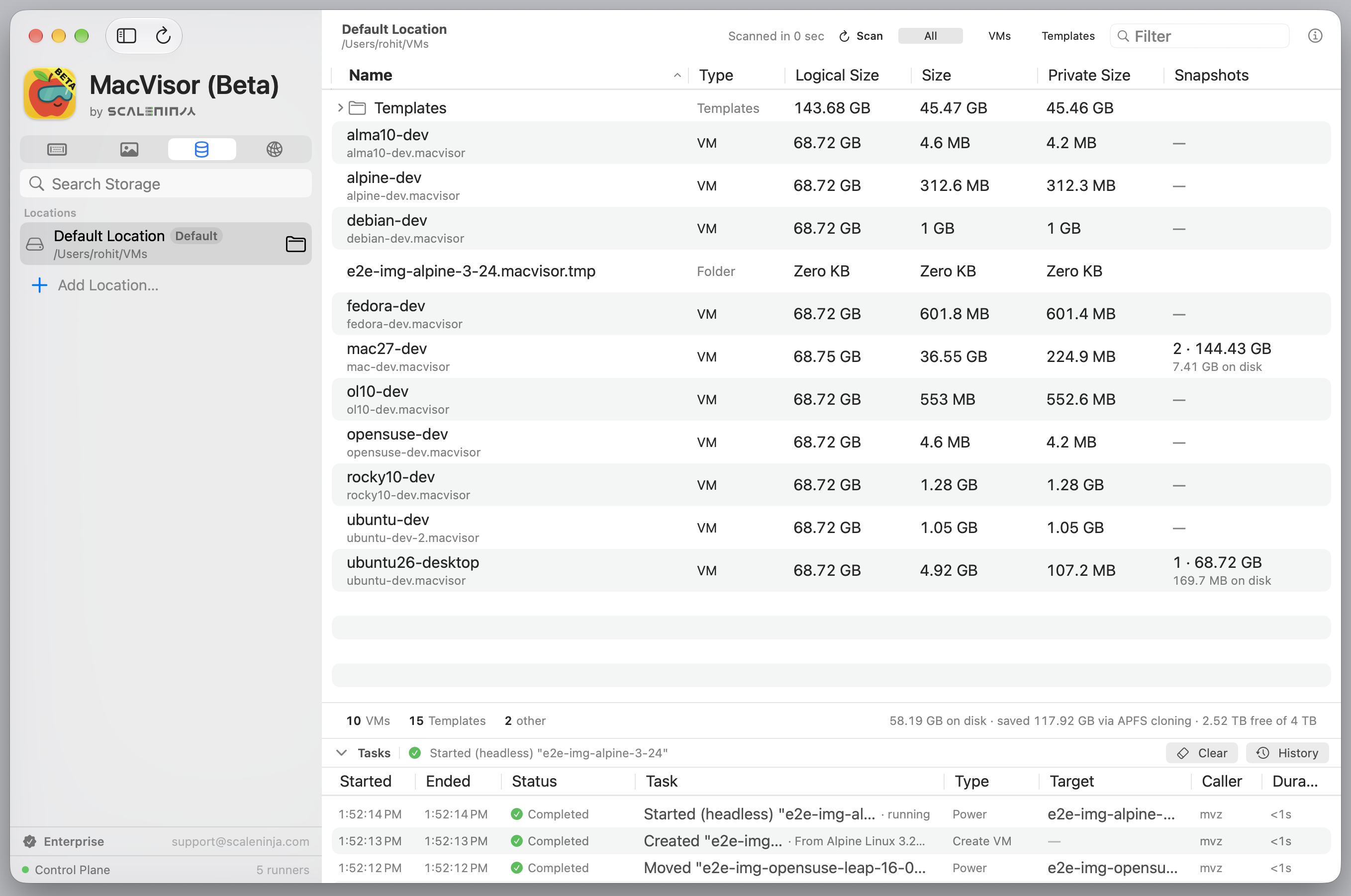
- A cold migration moves a stopped VM.
- A warm migration suspends a running VM, moves it, and resumes it. It is refused while the Mac's screen is locked, because macOS restores the session only while you are logged in at the Mac and it is unlocked; unlock it, or stop the VM and move it cold.
Do not disconnect a device while its VM is running or moving. mvz locations lists locations; mvz move <vm> <location> migrates, warm if the VM is running.
A location whose folder is missing, such as one on a disconnected drive, shows Offline in the sidebar's Storage section. Connect the drive; if it was the default location, you can right-click another and choose Make Default.
Templates, downloads and caches
| Path | What |
|---|---|
~/VMs (the default location) and any other location | VM bundles at the top level |
<location>/Templates/ | Cloud-image templates and VMs you converted |
<location>/Templates/Downloads/<file>.partial | Image downloads in progress; resumable, swept after two weeks if abandoned |
<location>/Templates/Installers/ | macOS installers (IPSW); new ones go to the default location. One you downloaded or added yourself is kept; one fetched to create a VM goes to the Trash when a newer build of that macOS version arrives |
~/Library/Application Support/MacVisor/RuntimeCache | Container runtime payloads shared with new cloud-image VMs |
~/.macvisor/ssh/, ~/.macvisor/run/ | Generated SSH config with pinned host keys; per-VM tunnel and Docker sockets while a VM runs |
See Cloud images and macOS installers.
Storage measurements
| Measurement | Meaning |
|---|---|
| Logical | Guest-visible capacity |
| Physical | Blocks allocated on the host |
| Private | Blocks actually freed if the bundle is deleted |
Private size accounts for sparse files and APFS blocks shared by clones and snapshots.
Additional disks and media
Add, resize, or remove disks in VM Settings while the VM is shut down with no suspended session (mvz disks add|remove; mvz set <vm> --disk grows the boot disk, and a cloud-image Linux VM grows its filesystem at the next boot). Attach ISO or raw images on the configured bus (mvz set <vm> --iso <file|none>); USB-bus images can be attached while a VM runs.
Removing a managed disk moves its image to the Trash. Eject the filesystem in the guest first.
Shared folders
MacVisor exposes host folders over VirtioFS, each under a tag, optionally read-only. A Linux VM made from a cloud image shares nothing unless you ask: --home (or Share my home folder (read-only) in the New VM form) shares your home folder read-only at the same path as on the Mac, and --project <dir> (or the form's project folder) shares a folder read-write, also at the same path. The form remembers your last home-folder choice; mvz create needs --home every time. Mounting elsewhere depends on the guest OS and its guest tools.
Shared folders cross the VM boundary on purpose. Share only what the guest needs, read-only where possible.
Not available on Oracle Linux
Shared folders need the guest kernel's virtiofs driver, and Oracle Linux's UEK kernel (releases 9 and 10) ships without it. MacVisor makes Oracle Linux VMs without shares: the New VM form says so, --project and the home share are skipped, and nothing tries to mount at boot. Use mvz send, the agent's file transfer, or scp instead. Every other catalogue image mounts shares normally.