
 DeltaSnap
  DriveSync
  Noject
  DeltaSync
 A custom network is a named private segment any number of VMs can join. VMs on it see each other directly; the mode decides whether anything routes outside.
| Mode | Behaviour |
|---|---|
| Shared (NAT) | Private segment plus an uplink that NATs to the outside through the Mac |
| Host Only | The host and the VMs on the segment, nothing beyond |
Manage them in the Networks section of the sidebar or with mvz networks. VMs made from cloud images join one by default, the Default MacVisor Network.
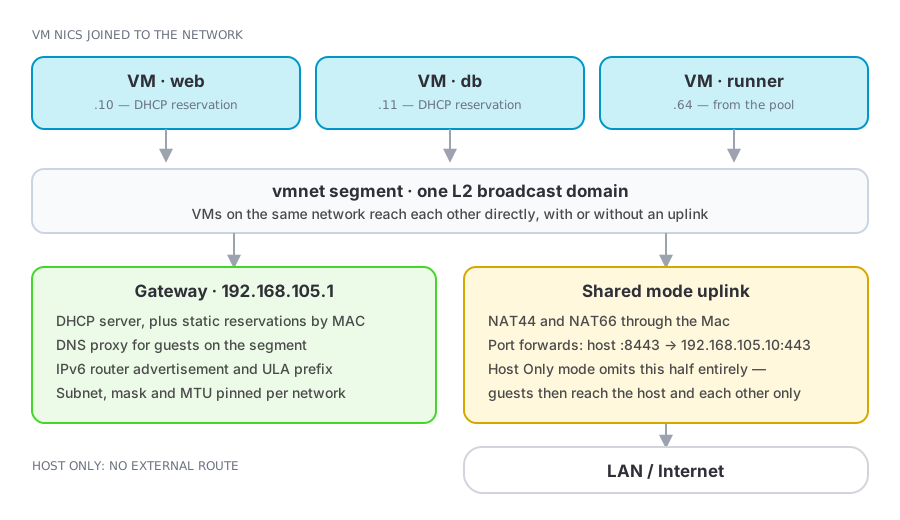
Defining a network
A network is a definition when you create it and becomes live when the first VM on it starts; the detail view shows which. Attach a VM in VM Settings → Network or with mvz set <vm> --network <network>; a running VM picks the change up at its next start.
mvz networks                                   # list
mvz networks create lab                        # shared, automatic subnet
mvz networks create isolated --host-only       # host-only, automatic subnet
mvz set dev --network lab
mvz networks rm lab                            # refused while a VM uses it
Addressing
Leave addressing empty and vmnet picks a /24 under 192.168.0.0/16. On macOS 27 what you can pin is limited by vmnet, not MacVisor:
| Network | Subnet | DHCP from macOS | Reservations |
|---|---|---|---|
| Shared (NAT) | Chosen by vmnet each time the network is created; a fixed subnet is refused | Yes | Honoured while the subnet stays the same |
| Host Only, automatic subnet | Chosen by vmnet | Yes | Honoured |
| Host Only, fixed subnet | Yours: a /24 under 192.168.0.0/16 | None | Ignored; set addresses inside the guests |
- IPv4 subnet and mask: host-only only, a
/24under192.168.0.0/16. MacVisor warns before you save anything else. Guests on a fixed subnet need static addresses. - IPv6 prefix and length: a specific ULA prefix instead of a random one.
- MTU: 1500 by default.
Applying a change to a shared network recreates it, and vmnet picks the subnet afresh. Addresses therefore survive VM restarts but not edits to the network. The firewall is keyed to the subnet and follows it; reservations and anything you wrote down by hand do not.
Services
Each network runs its own gateway services, individually switchable:
| Service | Purpose |
|---|---|
| DHCP server | Addresses guests from the segment's pool |
| DNS proxy | Guests resolve through the host (shared mode) |
| IPv4 NAT (NAT44) | Outbound IPv4 through the uplink (shared mode) |
| IPv6 NAT (NAT66) | Outbound IPv6 through the uplink (shared mode) |
| Router advertisement | IPv6 autoconfiguration on the segment |
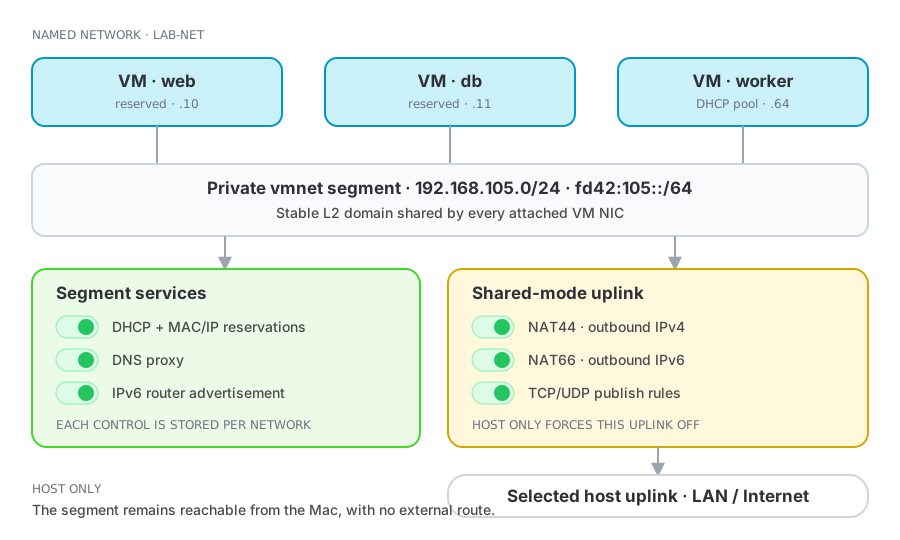
Services by mode
| Control | Shared (NAT) | Host Only |
|---|---|---|
| DHCP server | Configurable | Configurable (automatic subnet only) |
| DNS proxy | Configurable | Off |
| IPv4 NAT (NAT44) | Configurable | Off |
| IPv6 NAT (NAT66) | Configurable | Off |
| IPv6 router advertisement | Configurable | Configurable |
Host Only has no uplink, so switching a network to it turns DNS proxy, NAT44, and NAT66 off. In shared mode you can pin the uplink to one host interface, which is useful on a Mac with both Wi-Fi and Ethernet, or to go out through a VLAN interface.
While a network's firewall is on, NAT66 and router advertisement are off and their switches are greyed out, because the firewall filters IPv4 only and guests could otherwise go around it over IPv6. Your settings come back when the firewall is turned off. A shared network with NAT44 off is the exception: IPv6 NAT is its only way out, so its IPv6 stays on, unfiltered. VMs already running keep IPv6 until every VM on the network has stopped.
DHCP reservations
A reservation binds a MAC address to an address in the subnet, so a guest keeps its IP across reboots and reinstalls with no guest-side configuration. The MAC picker lists the NICs of VMs already on the network.
mvz ip dev --wait                          # see which subnet vmnet gave the network
mvz networks reserve lab dev 192.168.105.50
Two conditions, both vmnet's:
- The guest must send its MAC in the DHCP request. Cloud-image VMs do. A hand-installed Ubuntu sends a DUID until you set
dhcp-identifier: mac. - Reservations exist only where macOS serves DHCP: shared networks, and host-only networks on an automatic subnet. On a shared network they hold while the subnet stays; see Addressing.
Reservations are what make port forwards and firewall rules that name an address dependable.
Network port forwarding
Network-level forwards are vmnet NAT rules: a host TCP or UDP port maps to an address and port inside the segment.
host :8443 → 192.168.105.10:443Seeing what is attached
The network detail view lists every VM NIC configured for the network:
- Green: seen on the network's bridge via ARP.
- Orange: the VM is running but nothing from that NIC has been seen, or its attachment failed. Check the VM's runner log.
- Stopped: configured, not running.
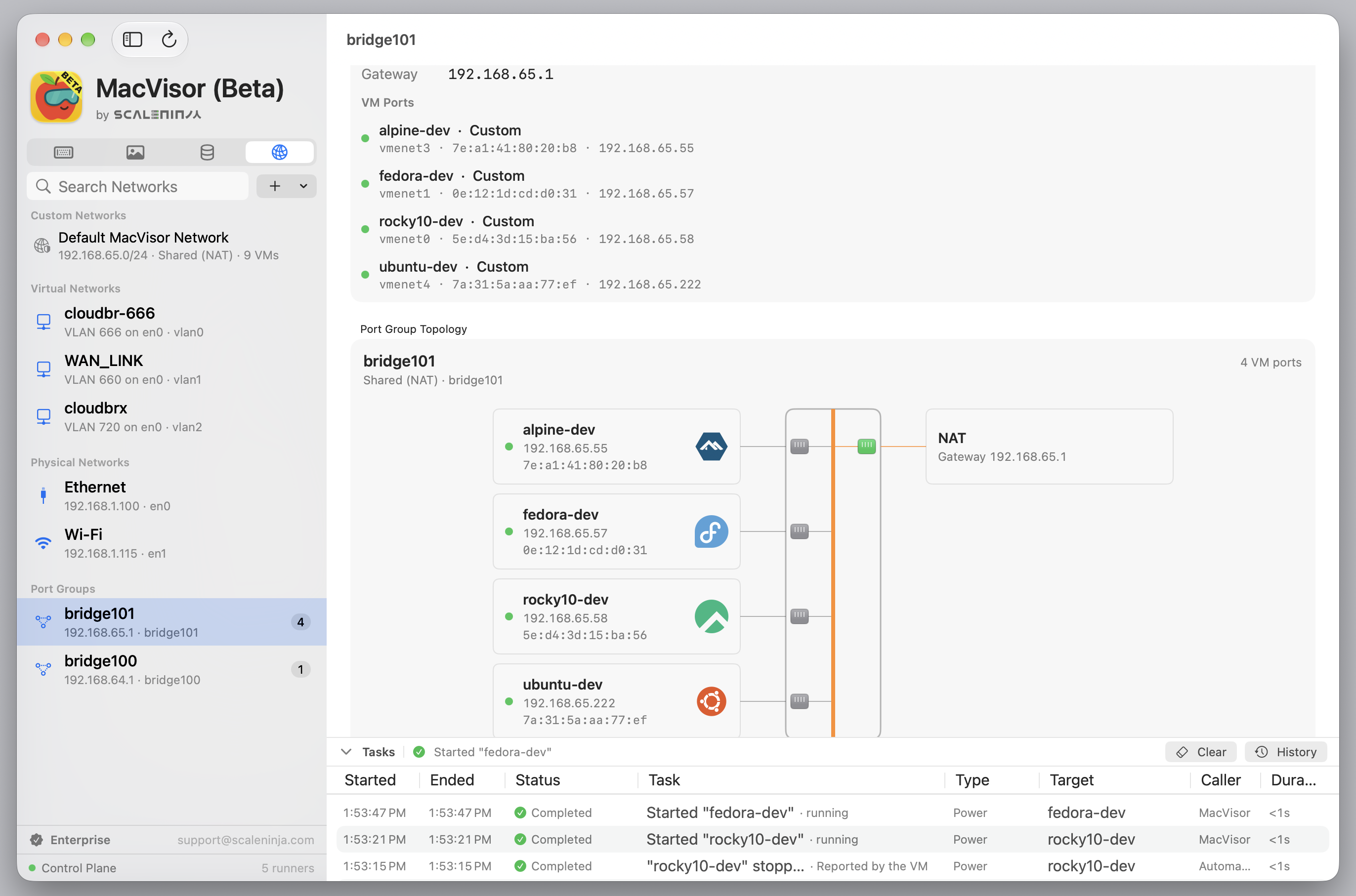
The Networks section also browses host interfaces (physical uplinks, vmnet bridges, VLAN interfaces) with their addresses, child interfaces, and attached VM ports.
VLAN interfaces
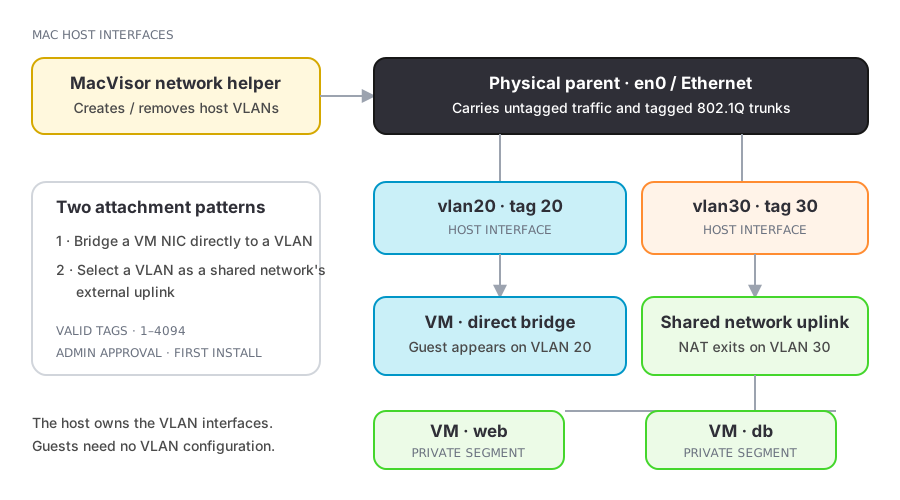
Apple's Virtualization framework has no VLAN tagging, so MacVisor creates 802.1Q VLAN interfaces on the host. New VLAN Interface… takes a name, a tag from 1 to 4094, and a parent interface. VLAN changes go through the network helper, which makes them for an administrator account without asking again and deletes only VLAN interfaces MacVisor created. A standard account, a Mac without the helper, or deleting a VLAN interface the helper didn't create (one made in System Settings, without the helper, or by an earlier MacVisor) asks for an administrator password each time. The result is a bridged host interface for VM NICs, and an uplink choice for shared networks.
Firewalling a network
Each custom network can carry an inbound/outbound policy enforced by the host packet filter, set in the app or with mvz networks firewall, and applied by the background service whether or not the app is open. Rules are checked in order and the first match wins; the CLI keeps them in the order you type them and adds new ones after the existing rules unless --clear. See Network firewall.
Deleting a network
Delete removes the definition; it and mvz networks rm are refused while a VM uses the network. That includes a suspended VM whose saved session was made on it, even if you have since moved the VM to another network, because the session resumes on the network it was saved with. Resume that VM and shut it down, or start it from disk, first. VMs still pointing at a deleted network land on the Default MacVisor Network the next time they are cloned or imported, so re-point their NICs first.