
 DeltaSnap
  DriveSync
  Noject
  DeltaSync
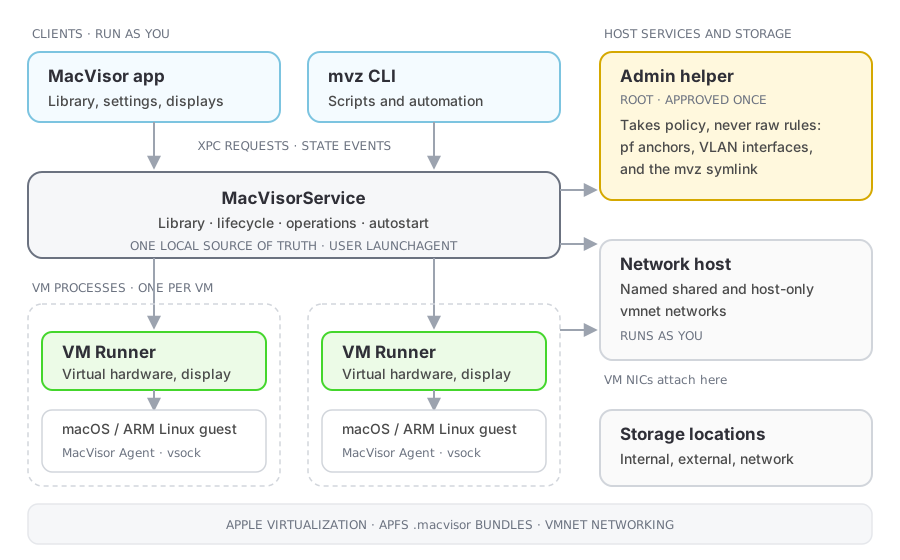
 MacVisor separates clients, management, and VM execution. The same installation works interactively, as a persistent virtualization host, or from scripts.
Three ways to use the same VMs
- Desktop virtualization. Create, configure, and open VMs in native windows with display, input, audio, clipboard, shared folders, file transfer, and USB devices. Closing a window does not stop the VM: the app is a client, not the owner of the VM process.
- Local virtualization host. The background service starts VMs headless, at login, and keeps them running with no window open. Named networks, port forwards, storage locations, and guest tools support always-on services and multi-VM labs. The app and
mvzare interchangeable clients. - Headless automation.
mvzcreates VMs from cloud images or templates, opens shells, and drives lifecycle, snapshots, files, ports, and consoles from scripts, for CI, tests, and isolated agent workloads. See Using the CLI.
Components
| Component | Role |
|---|---|
MacVisor app, mvz | Clients of the service. They list VMs, request changes, and receive state; they do not own VM processes |
| MacVisorService | The control plane, a login agent. Tracks VM bundles and tasks, downloads and verifies images, applies configuration, starts runners, handles autostart, enforces each network's firewall through the admin helper, answers <vm>.mvz and <vm>.macvisor lookups, keeps the license (every check with Polar, and the gate on adding to the library), and publishes state to clients |
| MacVisorVMRunner | One per running VM. Creates the virtual machine, owns its display and devices, reports state to the service. A runner failure affects only its VM |
| MacVisorNetworkHost | Runs the named shared and host-only vmnet networks that runners attach to. Default NAT and bridging use Apple's networking directly |
| MacVisorAdminHelper | The only root component, shown as Network Helper at setup: pf firewall rules, 802.1Q VLAN interfaces, the /usr/local/bin/mvz and macvisor links, and /etc/resolver/mvz and /etc/resolver/macvisor. Approved once with one administrator password; answers only the app and the service; takes policy, not packet-filter text, and re-checks each subnet itself; re-applies the last firewall policy at boot. See Security model |
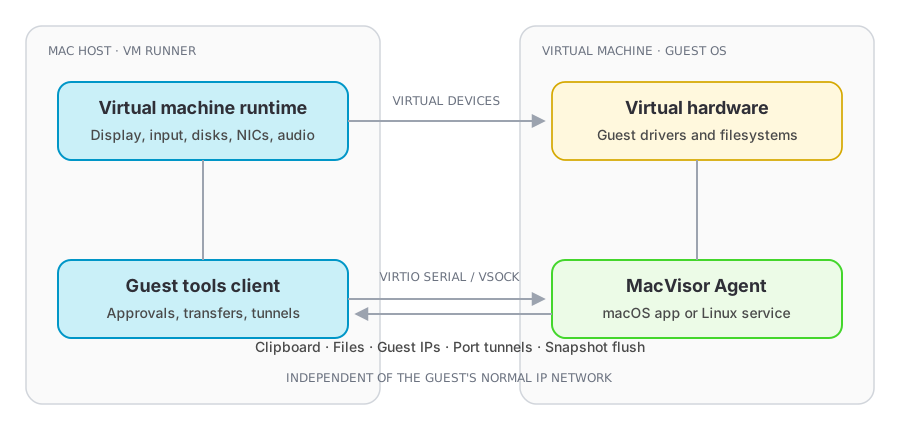
| MacVisor Agent | Optional, inside the guest. Talks to its runner over a virtual socket, not the guest's IP network: guest information, clipboard, file transfer, port tunnels (including the SSH tunnel behind mvz shell and the Docker socket), snapshot preparation. Installed by cloud-init in Linux cloud-image VMs and by MacVisor in macOS 27 guests with automatic setup |
Storage access
macOS blocks a background process's read of a removable, network, or protected folder until you consent. The service probes each storage location independently with a short grace period, so one waiting location never stalls the rest of the library. A location still waiting is reported in the sidebar and in mvz service status.
Independent lifecycles
- App or CLI restart. Clients reconnect and read current state. VMs keep running.
- Runner failure. Only that VM is interrupted.
- Service restart or upgrade. Runners keep running, and so does a macOS install. A restart you ask for from the dashboard or
mvzfirst lets work in progress, such as a clone or an export, finish. When the service returns it reconciles the live runners, follows the tasks still running, and drops stale records; management is briefly unavailable while it does. After an update the app restarts a service still on the old build;mvzsays so and points atmvz service restart.
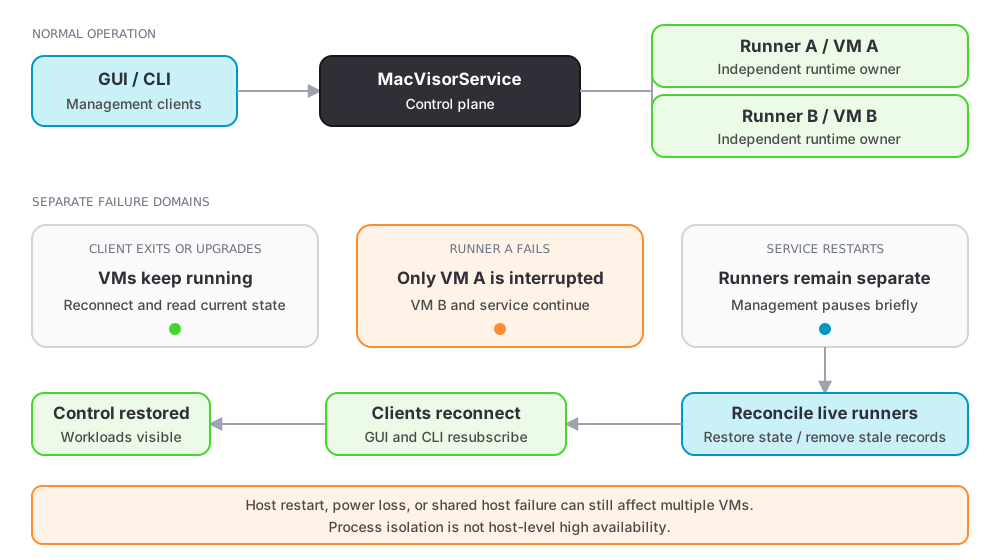
Crash isolation has limits. A macOS restart, power loss, or a failure in shared host infrastructure can still affect every VM; snapshots and host backups cover those.