
 DeltaSnap
  DriveSync
  Noject
  DeltaSync
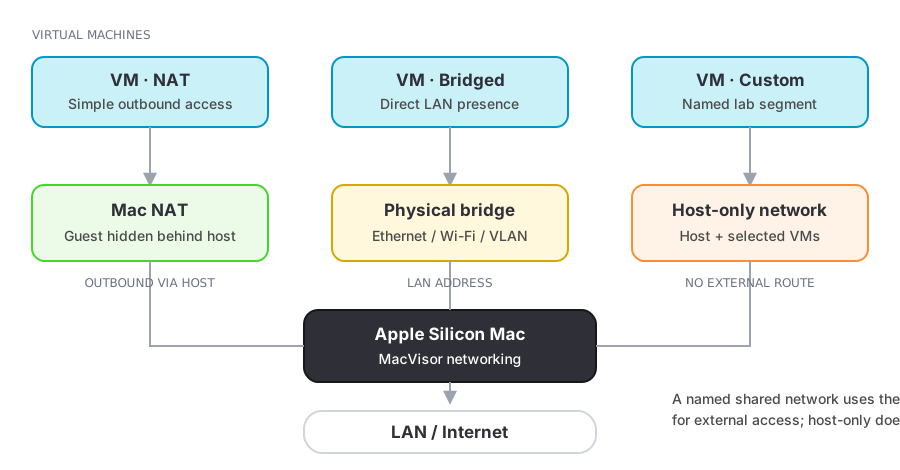
 Every VM has a primary network interface and can have up to three more. Each NIC keeps a stable MAC address and connects in one of three modes.
Network modes
| Mode | Use it for |
|---|---|
| NAT | Internet access through the Mac, nothing else |
| Bridged | The VM appears on a physical interface as its own device |
| Custom network | A named shared or host-only segment with DHCP, DNS, reservations, forwards, and a firewall |
Custom networks are described in Custom networks and their firewall in Network firewall.
The Default MacVisor Network
VMs made from cloud images join a shared custom network called Default MacVisor Network: they reach each other and, through the Mac, the internet. It is also the fallback. A new VM (created, cloned, imported, or made from a template) that names a network or bridged interface this Mac doesn't have is put there, and the service log says so.
mvz create ubuntu dev --network nat                        # or a custom network's id
mvz set dev --network nat|bridged:<interface>|<network>    # applies at the next start
Names
<vm>.mvzresolves on the Mac to the VM's current address:ping dev.mvz,curl http://dev.mvz:8080. The longer<vm>.macvisorworks too. The network helper installs/etc/resolver/mvzand/etc/resolver/macvisor, and the service answers from what the guest agent reports. It answers only with an address a VM can have: one on the Mac's VM networks or, for a bridged VM, on a network the Mac itself is on, never a loopback, link-local, or the Mac's own address. So a bridged VM on a network the Mac has no address on doesn't resolve. Aftermvz ssh-config --install,ssh dev.mvz(ordev.macvisor) and VS Code Remote-SSH work with the VM's host key pinned.host.mvz.internal(andhost.macvisor.internal) resolves inside a Linux guest made from a cloud image to the Mac.
Bridging
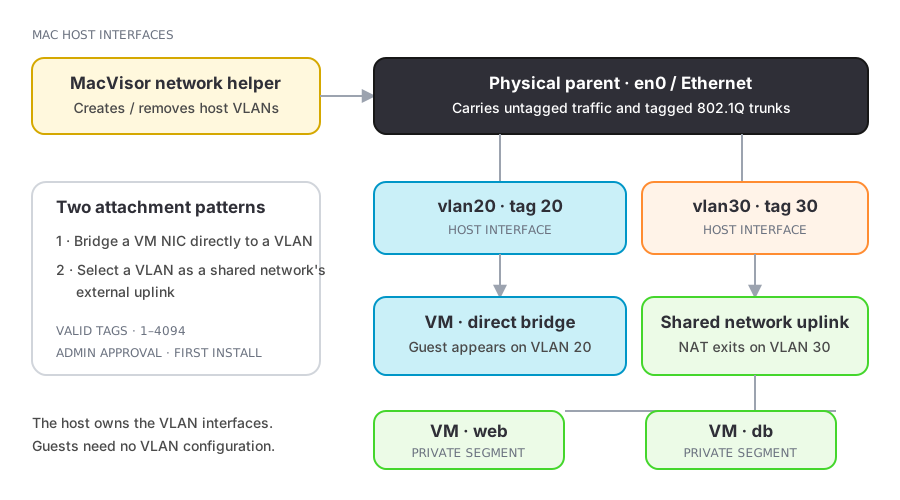
Pick a physical interface when the guest must be on your LAN. Your network's DHCP, switch configuration, and firewalls apply to it like any other device.
For tagged segments, create an 802.1Q VLAN interface from Networks → New VLAN Interface…. It appears as a bridged host interface a VM NIC can use directly, or that a shared custom network can take as its uplink. See VLAN interfaces.
Port forwarding
A VM made from a cloud image forwards automatically: every TCP and UDP port the guest listens on appears on the Mac's 127.0.0.1 at the same number, for as long as it listens (--no-forward at creation turns this off). For a fixed endpoint, or on any other VM with guest tools, add a per-VM forward:
mvz ports add <vm> --host-port 2222 --guest-port 22 --name SSH
mvz ports add <vm> --host-port 5353 --guest-port 53 --udp
mvz ports list <vm>
mvz ports remove <vm> <forward-id|host-port>
ssh -p 2222 localhost
Forwards listen on 127.0.0.1 unless --host says otherwise. Keep it that way unless other machines need access.
There are two kinds of forward:
| Per-VM forward | Network forward | |
|---|---|---|
| Path | Guest agent over vsock | vmnet NAT on a custom network |
| Needs guest tools | Yes | No |
| Protocols | TCP and UDP | TCP and UDP |
| Changes while running | Yes, immediately | No, fixed while the network is in use |
| Target | The VM itself | Any address inside the segment |
A Docker or Podman VM also gets its Docker API forwarded to ~/.macvisor/run/<id>.docker.sock with a matching docker context (mvz docker <vm>); a k3s VM's API server goes to 127.0.0.1:6443 (mvz kubeconfig <vm>).
Guest addresses
With guest tools connected, MacVisor reports live interface names and addresses:
mvz ip <vm>
mvz ip <vm> --wait        # block until an IPv4 address exists, print only it
Without the agent, address discovery depends on the network mode and can be incomplete.