
 DeltaSnap
  DriveSync
  Noject
  DeltaSync
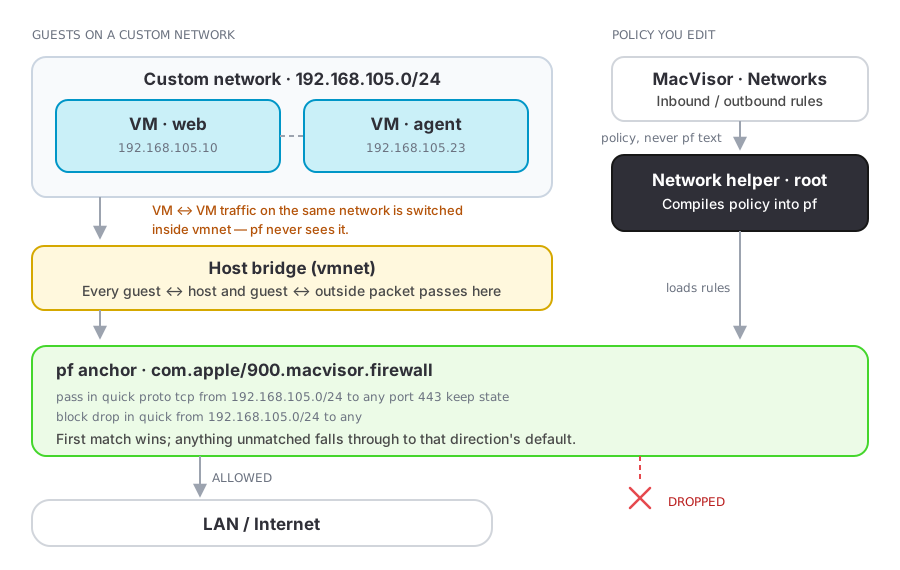
 Any custom network can carry a firewall policy: a default verdict per direction plus an ordered list of rules. MacVisor compiles it into the Mac's packet filter (pf), so the guest cannot turn it off and nothing is installed in it.
Open Networks, select a custom network, and switch on Enable Firewall.
Directions are relative to the VMs
| Direction | Means |
|---|---|
| Inbound | Traffic arriving at the VMs on this network |
| Outbound | Traffic the VMs send |
Each direction has a default, Allow or Deny. A rule names the far end of the flow: the destination of an outbound rule, the source of an inbound one.
Rules
A rule is: enabled, direction, action, protocol, remote CIDR, ports.
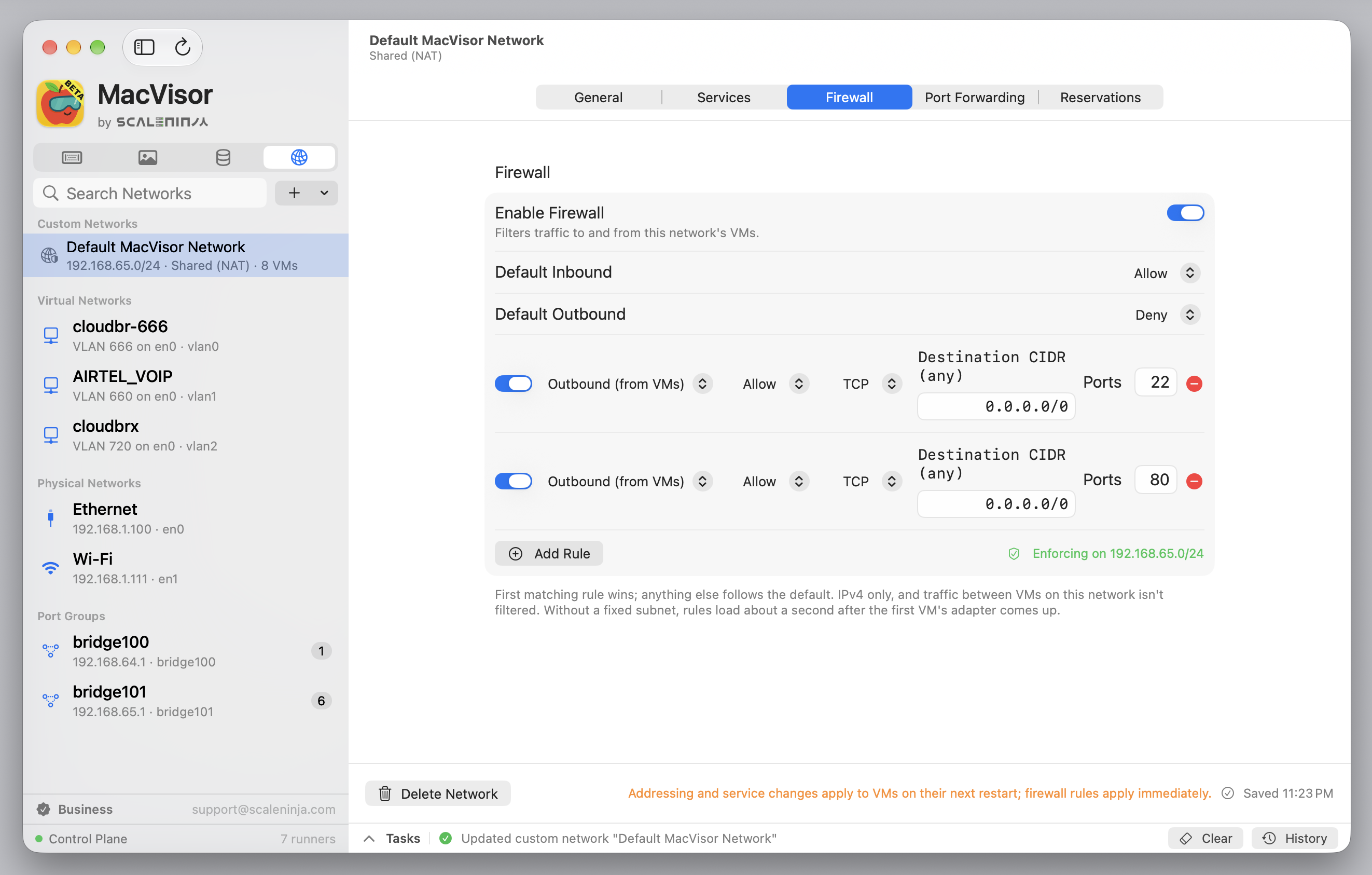
- Protocol: Any, TCP, UDP, or ICMP. Ports apply to TCP and UDP.
- Remote CIDR:
10.0.0.0/8, a bare address (192.168.1.50, treated as/32), orany. - Ports: one port (
443) or a range (8000-8080); empty means all.
First match wins, top to bottom; unmatched traffic gets the direction's default. Allow rules are stateful, so replies to a permitted flow come back even when the other direction denies by default. A rule that can't be enforced as written, such as one with an invalid CIDR or port range, is marked in the editor and skipped; the other rules still apply, and the network's status counts the skipped ones.
A lab segment that may reach the internet but not the corporate LAN:
| Direction | Action | Protocol | Remote | Ports |
|---|---|---|---|---|
| Outbound | Deny | Any | 10.0.0.0/8 | |
| Outbound | Allow | TCP | any | 443 |
with both defaults set to Deny.
What always stays open
DHCP within the segment, and DNS to the gateway when the DNS proxy is on. Without them a deny-by-default network would never hand out an address.
Applying
The background service applies every network's policy through the network helper, whether or not the app is open: when it starts, when you change a policy in the app or with mvz, and when a VM on the network starts. A changed policy takes effect at once, and pf state for the subnet is flushed so existing connections cannot coast on the old verdict. Switching Enable Firewall off withdraws that network's rules.
The Firewall section of the network says where it stands:
| Status | Meaning |
|---|---|
Enforcing on <subnet> | The rules are in pf; any skipped rules are counted beside it |
| Starts when a VM runs on this network | The network has no subnet yet; the rules load when its first VM starts |
| Needs approval to enforce | The network helper isn't installed or approved |
| Not enforced | Something is in the way; the reason is shown under the rules |
The network helper is normally installed during first-run setup. If you declined it, Approve… next to the status installs it with one administrator password; if macOS holds it for approval, turn it on in System Settings → Login Items & Extensions.
The helper keeps the last policy and re-applies it at boot, before anyone logs in. Uninstalling MacVisor clears the rules.
From the command line
mvz networks firewall lab on --outbound deny --allow out:udp:53 --allow out:tcp:443
mvz networks firewall lab --inbound deny
mvz networks firewall lab --clear --deny out:any::10.0.0.0/8 --allow out:tcp:443
mvz networks firewall lab off
A rule is in|out[:tcp|udp|icmp|any[:<ports>[:<cidr>]]], each part optional from the right. Rules keep the order you type them, --allow and --deny mixed, and the first match wins. New rules go after the existing ones; --clear drops those first. In the --clear line the deny comes first, so TCP 443 to 10.x addresses is blocked while 443 anywhere else is allowed. The background service checks the rules and applies them before the command returns, whether or not the app is open. A rule that can't be enforced as written is refused, with the reason, and nothing is saved. The command prints the resulting rule list, numbered in the order it is evaluated, and whether it is in force:
Firewall on lab: on, enforced on 192.168.105.0/24 — inbound deny, outbound deny, 2 rules.
  1. deny outbound any to 10.0.0.0/8
  2. allow outbound tcp 443 to any
IPv6 is off on this network while the firewall is on (the firewall filters IPv4 only); running VMs keep theirs until every VM on it has stopped.
When the rules are not in force, the first line says on, but NOT enforced yet and the reason follows the list: most often that no VM has run on the network yet, or that the network helper isn't approved. mvz networks shows each firewall as on, pending (saved but not in force), or off.
Verifying
The network's status, or mvz networks firewall <network> with no other options, says whether the rules are in force. To read back what pf is enforcing, with per-rule match counters, use Terminal:
sudo pfctl -a 'com.apple/900.macvisor.firewall' -sr
sudo pfctl -ss
Limits worth knowing before you rely on it
How enforcement is wired
Rules live in a sub-anchor of pf's com.apple/* namespace, which the stock /etc/pf.conf already evaluates. MacVisor never edits pf.conf or reloads the main ruleset, because that would flush the anchors macOS installs for internet sharing and break NAT for other networks.
The helper receives policy, never packet-filter text, and compiles it itself, so a user-level process cannot express anything the interface does not already allow. See Security model.