
 DeltaSnap
  DriveSync
  Noject
  DeltaSync
 DeltaSnap is a native app and command-line toolkit for a single-user Mac running macOS 15 or later. It turns APFS volume snapshots into practical version control for files and folders: creating checkpoints, indexing filesystem history, finding deleted files, showing every captured version of an item, comparing changes, and restoring only what you need.
Snapshot contents remain native APFS data rather than a proprietary archive. DeltaSnap adds the signed background helper, local history index, graphical workflows, retention policy, Finder integration, and bundled dsnap CLI around that machinery.

What you can do
- Browse current and deleted files in Version Control and inspect a per-item version timeline.
- Use snapshots other apps left behind, from Time Machine, Carbon Copy Cloner, SuperDuper, or Arq, as history you can mount, compare, and restore from, or delete them if they are not needed.
- Decide per volume whether DeltaSnap manages it at all, with a single Track Volume switch.
- Search indexed history across managed volumes, including deleted file names.
- preview, reveal, compare, drag out, or restore a captured version;
- create safety, protected, and scheduled APFS snapshots;
- compare two snapshots with added, removed, modified, replaced, and moved paths;
- monitor important folders for mass change and create a safety snapshot on alarm;
- get told about failures, alarms, and low space in the app, quietly by default, or by email through your own mail server;
- analyze which deleted or replaced files are still holding snapshot space;
- automate volume, snapshot, tag, mount, hold, schedule, and diff operations with
dsnap; and - install an open-source Agent Skill that teaches compatible AI tools to checkpoint and verify risky changes.
Why it is fast
The speed is not an optimisation, it is the storage model. APFS snapshots are copy-on-write metadata, so creating one does not copy your files. It records the state of the filesystem and returns.
| Operation | DeltaSnap | A file-copying backup app |
|---|---|---|
| Create a checkpoint | Milliseconds, whatever the volume holds | Minutes to hours, scaling with data |
| Space used at creation | Effectively none | A full or incremental copy |
| Restore one file | A local copy on the same disk | Read back from the backup destination |
| Works when the drive is unplugged | Yes, history lives on the volume | No |
Three consequences follow from snapshots living on the same physical disk as the volume they capture:
Checkpoints are free enough to take constantly. A snapshot before a risky refactor, an installer, or an AI agent's edits costs a moment and no meaningful space, so there is no reason to skip one. Space is only consumed later, as the live volume diverges from the captured state.
Restores read at local disk speed. Recovering a file means copying it from the same SSD, not pulling it across USB, a network share, or the internet. There is no destination to wake, mount, or authenticate against.
History is always there. No backup disk to plug in, no server to reach, nothing to schedule around. Every managed volume carries its own history.
The trade is the same one that makes it fast. Snapshots share the volume, so they cannot survive that volume being lost, erased, or stolen. DeltaSnap is the fast layer, not the last one, and the section below spells out where its responsibility ends.
How the pieces fit
The app, Finder extension, and CLI use an authenticated local connection to a privileged background helper. The helper performs APFS operations, scheduling, pruning, indexing, restores, and monitoring while the app is closed.
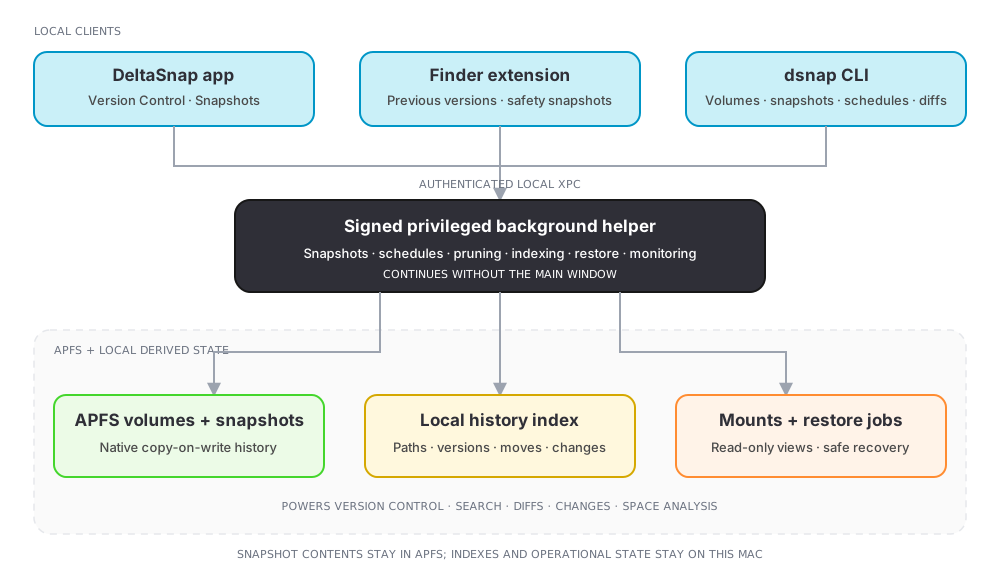
DeltaSnap works at volume scope. Every snapshot captures the whole selected APFS Data volume, even when you created it for one project. Version Control narrows that volume-wide history back down to the file or folder you care about.
Start with Version Control
After DeltaSnap creates and indexes its first owned snapshot on a volume, select the volume and open Version Control. The browser combines the live namespace with files that now exist only in snapshot history. Select any item to see its current state and captured versions.
Version Control covers indexed locations only. Excluded caches, application bundles, and transient trees can still be inspected with a direct snapshot mount or a one-off Compare Everything scan, but they do not receive a persistent version timeline.
DeltaSnap is not a backup
APFS snapshots share the source volume. They are excellent for quick undo, diffing, and recovery from logical mistakes, but they are lost with the disk, container, or Mac. Keep an independent local or offsite backup for drive failure, erase, theft, and disaster recovery.
| Recovery layer | Best at | Does not survive |
|---|---|---|
| DeltaSnap / APFS snapshots | Fast file history, inspection, comparison, and local recovery | Loss or erase of the source volume |
| Independent local backup | Large restore from a separate disk or NAS | Theft or disaster affecting both devices |
| Remote/offsite backup | Site-wide loss | Fast interactive recovery of one local edit |
Continue with APFS and snapshots for the storage model, follow the Quickstart to create your first usable version history, or install the AI agent skill.