
 DeltaSnap
  DriveSync
  Noject
  DeltaSync
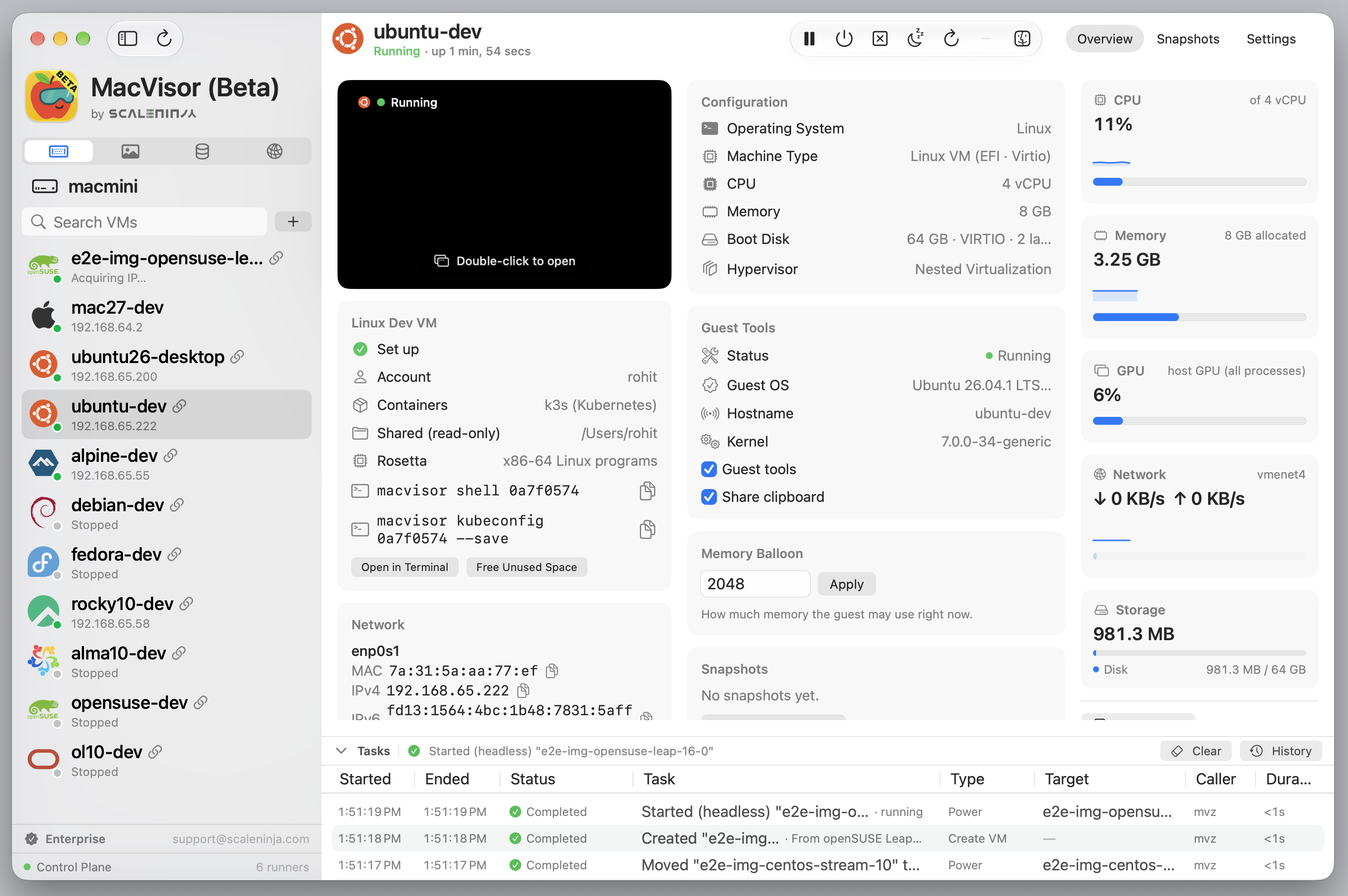
 MacVisor is a native virtual-machine manager for Apple Silicon Macs. It runs macOS and ARM Linux guests on Apple's Virtualization framework and puts their lifecycle, snapshots, storage, networking, guest integration, and automation in one app and one command-line tool.
What you can do
- Make Linux VMs from a catalogue of distribution cloud images (Ubuntu, Debian, Fedora, Rocky Linux, AlmaLinux, Oracle Linux, CentOS Stream, openSUSE Leap, Alpine), set up by cloud-init with your account and SSH keys, and, if you choose, a container runtime and your home folder shared read-only. Or install ARM Linux from an ISO.
- Install macOS from a catalogue installer (
macos-27,macos-latest…) or an IPSW. macOS 27 guests skip Setup Assistant and install the MacVisor Agent themselves. - Open a shell in any VM with
mvz shell, reach it as<vm>.mvz, and use its Docker from the Mac. - Run VMs with a display or headless; pause, suspend, resume, restart, and shut down.
- Take disk-only or live snapshots; revert, export, or clone from them.
- Keep disks in ASIF, Apple's sparse format, and convert raw disks in place.
- Build templates, or fork a VM instantly with a linked clone that shares its disk.
- Create named shared and host-only networks, bridges, and 802.1Q VLAN interfaces, with per-network DHCP, DNS, NAT, address reservations, port forwards, and a host-enforced firewall.
- Share folders, clipboard, files, and ports through the guest tools.
- Start VMs at login and run the Mac as an always-on virtualization host.
- Watch host resources, allocation, tasks, and service health on the dashboard.
- Do all of it from the command line with
mvz.
Native virtualization
MacVisor runs ARM64 guests directly on Apple Silicon. It does not emulate x86 and has no Windows support; x86 images will not boot.
macOS guests get Apple's accelerated graphics, Linux guests Virtio graphics. Nested virtualization needs an M3 or later Mac; automatic macOS setup needs a macOS 27 guest.
VMs run independently of the window
A background service owns the library and starts one runner process per VM. Closing the app or a VM window does not stop a guest, and one VM's failure does not affect another.
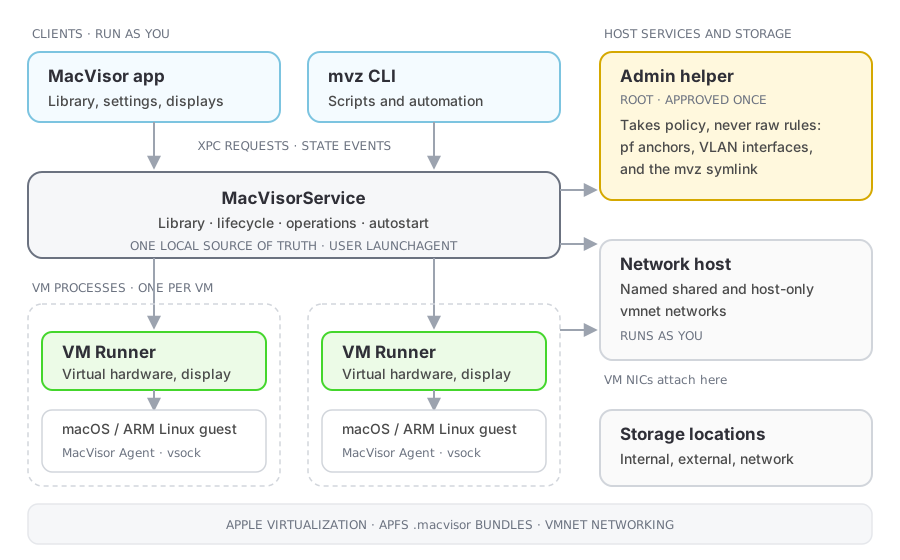
The same installation works as desktop virtualization, as a persistent local virtualization host, and as headless infrastructure driven by mvz. See Architecture for the components and recovery behaviour, and Security model for what runs with which privileges.
What a VM is
A .macvisor package holding configuration, disks, platform data, saved state, and snapshots. VMs can live in several storage locations and move between them.
MacVisor 27 runs on Apple Silicon Macs with macOS 27. The MacVisor Agent inside a macOS guest supports macOS 14 and later.