
 DeltaSnap
  DriveSync
  Noject
  DeltaSync
 Start and open
Starting a VM launches its own runner process. The VM opens in a window, or runs headless without a graphics device. When you start a VM from MacVisor, open its window, or revert it to a live snapshot and resume, its window comes to the front.
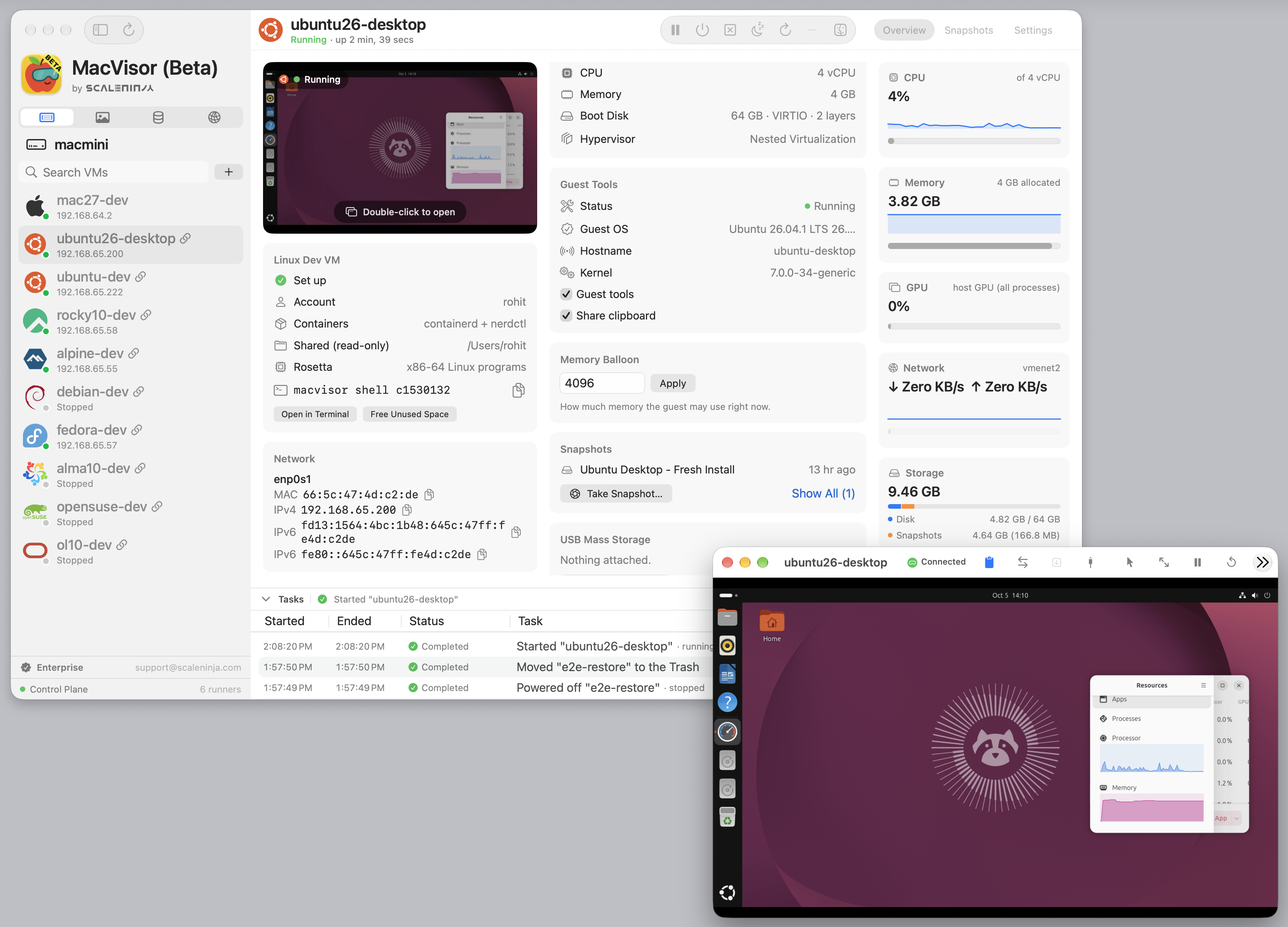
Closing the window follows the VM's policy, When the Window Closes in VM Settings → General: Hide Window, Ask Each Time, or Shut Down VM. Hiding is not stopping: ⌘Q in a VM window hides it too, and the VM keeps running and using its memory. The first time you hide a VM window, MacVisor says so and offers to shut the VM down instead. Open the window again from MacVisor or with mvz open.
Actions that lose guest state (Power Off and Discard Saved State) ask first and say what will be lost.
VM window shortcuts
| Action | Shortcut |
|---|---|
| Pause or Resume | ⌃⌘P |
| Shut Down | ⌃⌘S |
| Restart | ⌃⌘R |
| Power Off | ⌃⌘K |
| Capture Input | ⌃⌘I |
| Enter or Exit Full Screen | ⌃⌘F |
| Hide Window (VM Keeps Running) | ⌘Q |
Shut Down and Restart ask first when you use the shortcut. While a snapshot or a suspend is being saved, Pause, Shut Down, and Restart are unavailable. Power Off still works, and at once rather than after the save: the snapshot or suspend is abandoned, and nothing half-saved is kept.
Lifecycle actions
| Action | Result |
|---|---|
| Pause | Freezes execution in memory |
| Resume | Continues a paused or suspended VM |
| Suspend | Saves the VM's state to disk and stops it. Refused up front when the VM's volume clearly lacks the space; a save that fails anyway leaves the VM running |
| Stop | Asks the guest to shut down. A macOS guest with the agent connected is asked through the agent, so it works with a user signed in; otherwise through the virtual power button |
| Power off | Cuts the virtual hardware at once; only when shutdown is unavailable |
| Restart | Shuts down and starts again |
| Discard Saved State | Drops a suspended session so the VM cold-boots next time |
When a saved session won't restore
A suspended VM normally resumes where it was. macOS restores a saved session only while you are logged in at the Mac with the screen unlocked; saving works while locked. With the screen locked, or someone else's session on screen, MacVisor does not try: the Overview says Waiting for the Mac to be unlocked, and mvz resume over SSH says the screen is locked and that the saved session is intact. Unlock the Mac (or connect with Screen Sharing) and resume again.
If a restore fails for another reason, MacVisor says why on the VM's Overview with Try Again and Start from Disk…, which drops the session and boots from the disk as it is. Nothing on the disk is lost. If the session needs something that is gone, such as a custom network deleted since, MacVisor says that changing the VM's settings won't help and suggests starting from disk.
Saved memory, whether from a suspend or a live snapshot, is tied to the macOS release that saved it. Expect to start from disk after a major macOS upgrade; shut VMs down rather than suspending them before one. During the beta, a MacVisor update can do the same. MacVisor then says it was updated since the VM was suspended and offers only Start from Disk…, and a VM set to start at login starts from its disk by itself. Treat suspended VMs and live snapshots as a convenience for the versions you are on, not something kept across updates. On macOS 27, a VM whose disk caching is set to Cached has sometimes failed to restore too; see VM settings.
From the CLI, mvz show <vm> explains, and:
mvz start <vm> --discard-state
mvz resume <vm> --discard-state
When you log out or restart the Mac
What running and paused VMs do when the Mac logs out, restarts, or shuts down, including a restart from Terminal such as sudo shutdown -r now, is your choice in Settings → General → Logout and Shutdown:
- Shut Down VMs, the default. Each guest is asked to shut down, through the agent on a macOS guest and the virtual power button otherwise, and is powered off if it hasn't finished within 30 seconds. VMs set to start at login boot fresh at the next login.
- Suspend VMs. Each VM's memory is saved to disk; a running guest with the agent connected is first asked to write its files to disk. VMs set to start at login resume at the next login; the others stay suspended until you resume them or start them from disk. A VM that can't be saved, for lack of space for example, is shut down instead. A saved session can't be restored after a macOS update, so a VM set to start at login then starts from its disk.
Either way, a VM that is starting, suspending, or taking a snapshot gets up to a minute to finish first, and one already shutting down gets 30 seconds, then is powered off. A shutdown that bypasses the login window, such as sudo shutdown or launchctl reboot, shortens these waits, giving a guest 12 seconds to shut down rather than 30, because macOS waits only about 20 seconds for MacVisor.
The choice applies to VMs already running, except those started by a MacVisor version without the setting: they still suspend at logout until you shut them down and start them again.
mvz service at-logout              # show the current choice
mvz service at-logout suspend
mvz service at-logout shutdown
Input and display
The VM window can capture system keys for the guest; Control-Command or Control-Option releases input. Display presets, window-matched resolution, headless mode, and additional displays (macOS guests) are in VM settings. Accelerated graphics is macOS-guest only; Linux uses software-rendered Virtio graphics.
Headless and autostart
Headless mode omits the graphics device. Start at Login has the background service start the VM at each login, whether or not the MacVisor app opens. A VM that was shut down boots fresh; a suspended VM resumes its saved state, and if the Mac is locked at that moment it waits and resumes once you unlock it. What happens when a saved session doesn't resume is in Always-on host.
mvz start <vm> --headless
mvz wait <vm> --ssh             # until the agent answers, cloud-init is done, and SSH is up
mvz ip <vm> --wait              # prints just the IPv4 address; exit 5 if none within 10 minutes
mvz autostart <vm> on
mvz open <vm>
mvz discard-state <vm>
mvz screenshot <vm> frame.jpg   # the window must have been shown since the VM started
mvz shell <vm> starts a stopped VM itself and connects as soon as SSH answers, so a script that only needs a shell can skip start and wait.
Coming back after an unattended reboot depends on host settings; see Always-on host. For lifecycle actions without the main window, turn on the menu bar item in Settings → General.
Serial console
Turn on Serial Console under VM Settings → Advanced, restart the VM, then:
mvz console <vm>Control-] detaches.