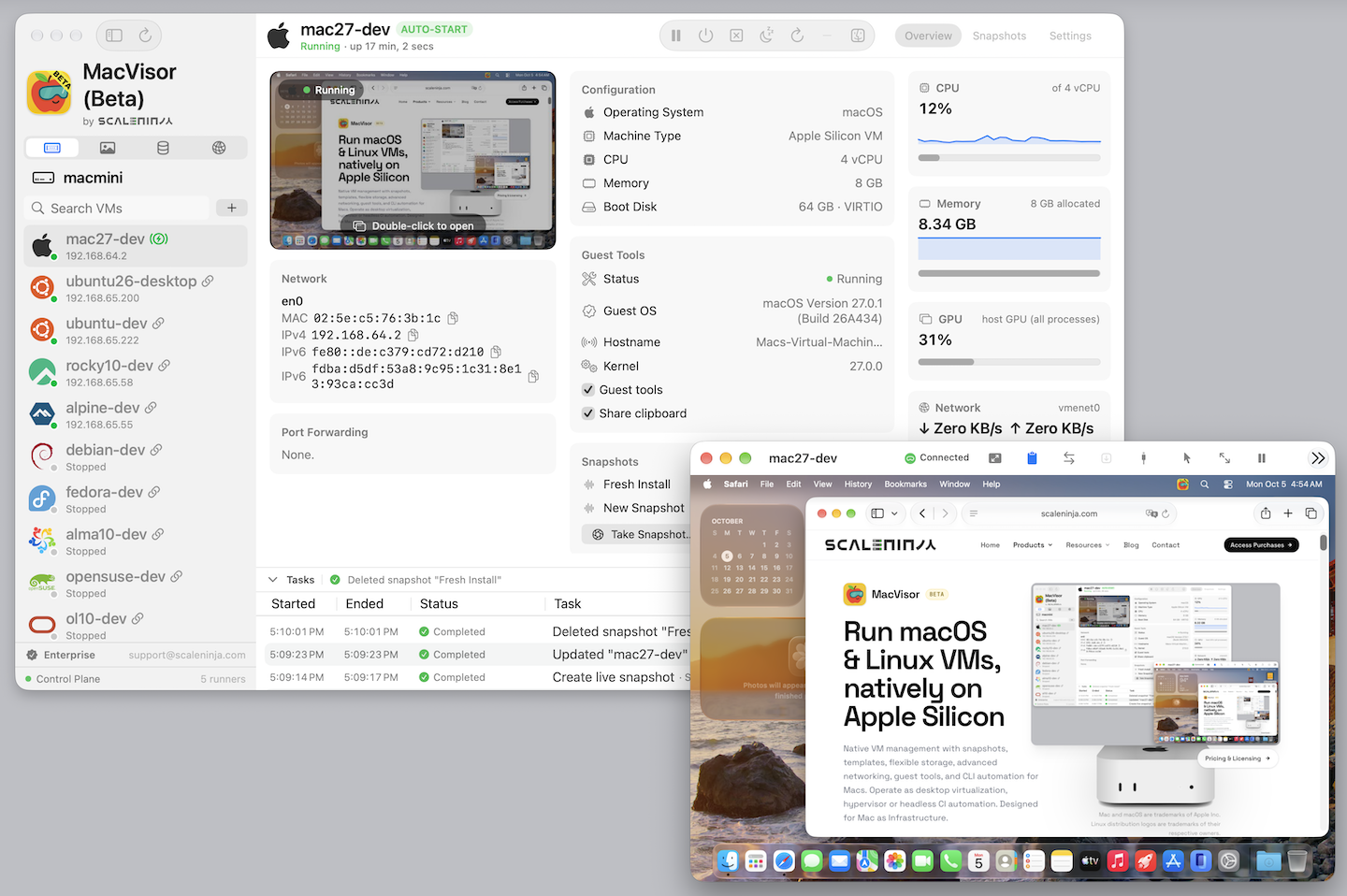
Native VM management with snapshots, templates, flexible
storage, advanced networking, guest tools, and CLI automation for Macs.
Operate as desktop virtualization, hypervisor or headless CI
automation. Designed for Mac as Infrastructure.
Run AI agents safely in a sandboxed macOS VM. Stronger, VM-level isolation from your host, with the shared GPU for Metal/MLX acceleration.
MacVisor brings desktop VM ergonomics and virtualization-platform
controls into one native app. These features reflect the current
beta implementation, not roadmap items.
MacVisor 27 requires macOS 27. Some features additionally depend on supported Apple Silicon hardware.
Guests
Linux dev VMs from a signed catalogue of cloud images: Ubuntu, Debian, Fedora, Rocky, AlmaLinux, Oracle Linux, CentOS Stream, openSUSE Leap, Alpine
cloud-init sets up your account and SSH keys and the guest agent, plus, when you ask, a container runtime (containerd, Docker, Podman, k3s) and your home folder at the same path
Native macOS VMs from a catalogue installer (macOS 27, 26, 15, 14) or your own IPSW
macOS 27 guests skip Setup Assistant and get the MacVisor Agent installed for you
ARM64 Linux VMs installed from ISO
Rosetta 2 sharing for x86_64 Linux applications
Virtual hardware
Dynamic displays for macOS and Linux VMs
Accelerated Graphics (shared GPU) for macOS
Mac keyboard, trackpad, audio, and input capture
Virtio or NVMe disks, hot-plug USB disks and ISO media
Nested KVM for supported Linux guests
USB device passthrough and runtime device capture
Snapshots
Instant Disk-only and Live (disk and memory) snapshots
Safety snapshots before rollback (revert)
Create VM or export from any snapshot
Reusable templates, copy-on-write clones, and instant linked clones
Plain-words recovery when a saved session will not restore: Try Again or Start from Disk
Advanced Networking
Default NAT plus named shared-NAT and host-only networks
Every VM reachable by name as <vm>.mvz; host.mvz.internal inside the guest
Automatic TCP and UDP port forwarding for cloud-image VMs, plus manual per-VM forwards
Host 802.1Q VLAN creation and physical or VLAN bridge uplinks
Per-network DHCP and stable MAC/IP address reservations
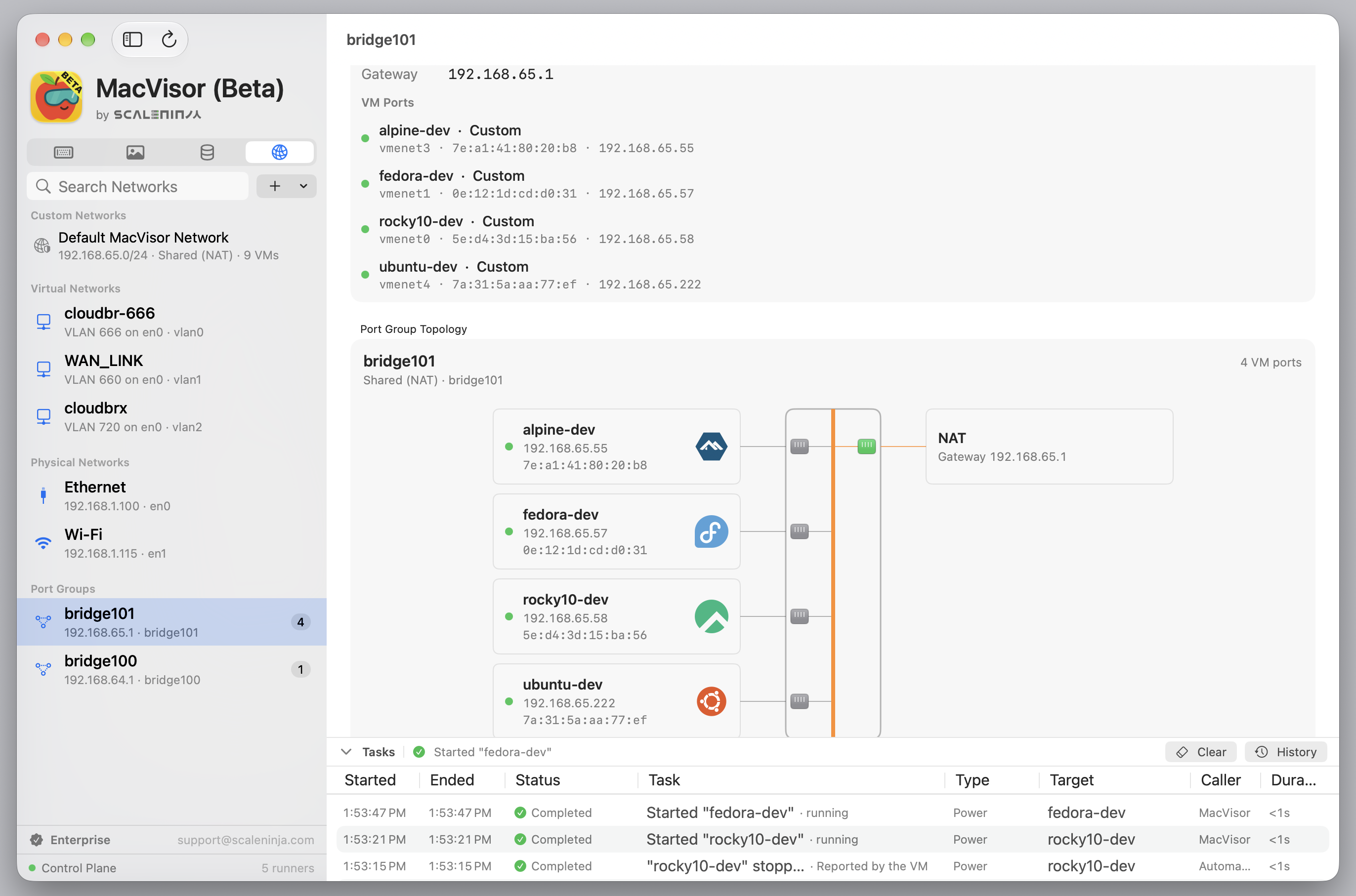
TCP/UDP NAT forwarding and visual network topology
Individual DHCP, DNS proxy, NAT44, NAT66, and IPv6 RA controls
Host-enforced per-network IPv4 firewall policy, from the app or the CLI
Flexible Storage
ASIF sparse disks throughout, with in-place conversion of legacy raw disks
Cloud images downloaded once, verified against the vendor checksum, kept as templates; resumable downloads
Multiple internal or external storage locations
Cold migration for stopped VMs and templates
Warm migration for running VMs
Portable VM import and export workflows
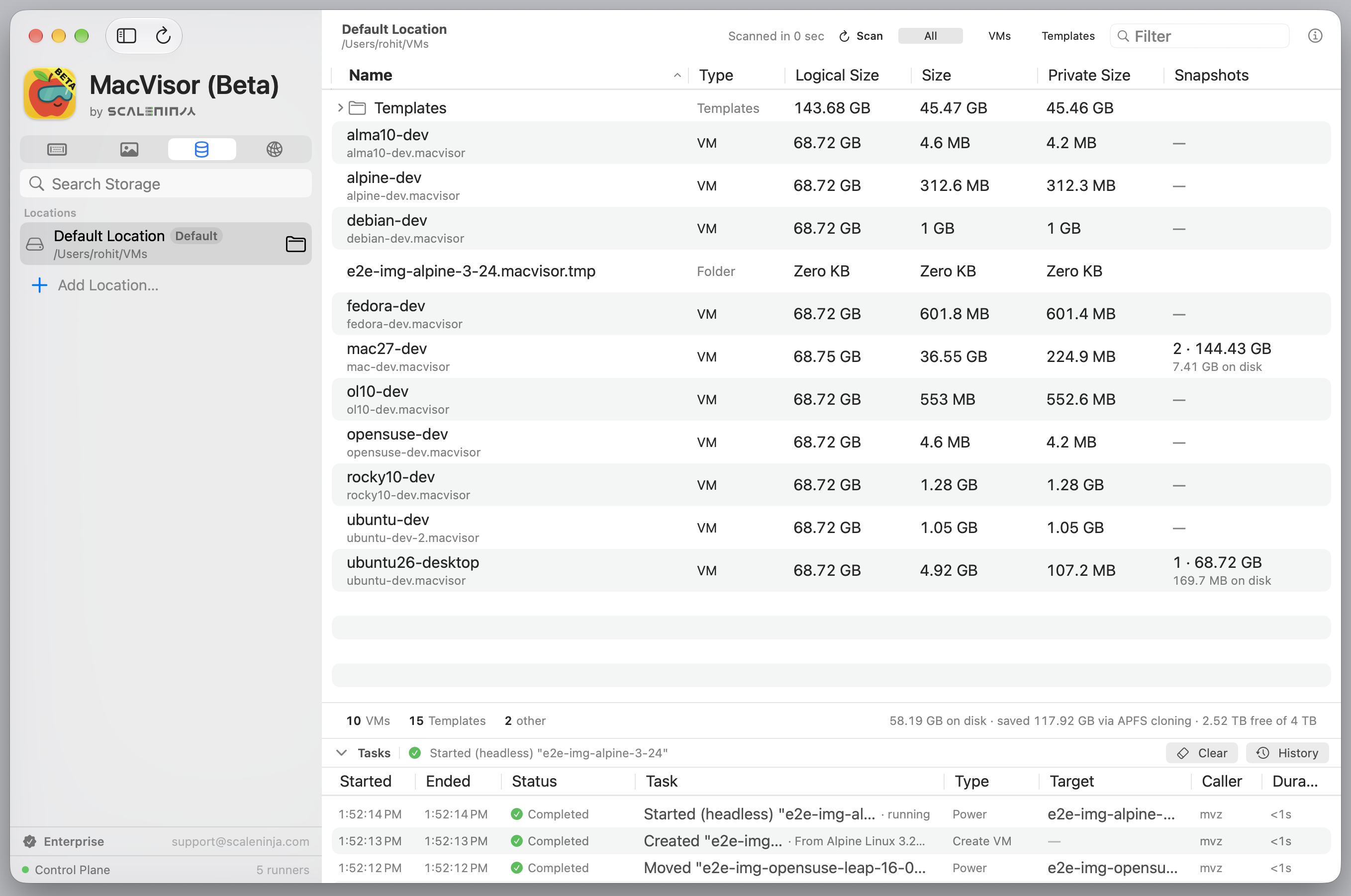
Storage browser with logical, physical, and private sizes per location
Integration and operations
mvz shell and exec: an SSH shell in any VM over the guest agent, as your own account
A Docker socket and docker context per VM; kubeconfig for k3s VMs
Drag-and-drop files between macOS host and guests
Bidirectional files, clipboard, and port forwarding tunnels powered by guest tools
VirtioFS shared folders for macOS and Linux
Autostart, metrics, task progress, and runner health
The mvz CLI, serial console, and headless operation
The MacVisor Architecture
A control plane, not a window that happens to run VMs.
MacVisor separates management, clients, and VM execution. An always-running
control plane owns orchestration and policy. The native GUI and
mvz
CLI act as independent clients, while every VM runs in its own isolated process.
That same architecture works as a desktop app, a persistent local host, or a
CLI-driven virtualization platform.
MacVisor process model
One host, independent lifecycles
Always Online
01
Separate lifecycles
Restart the GUI, close a display, or run only the CLI without making those client lifecycles the VM lifecycle.
02
Crash isolation
Each VM has a dedicated runtime owner, so one runner failure does not take down every workload or the control plane.
03
One source of truth
GUI and CLI issue the same typed requests and receive the same state events from the service.
04
Service recovery
After a control-plane restart, MacVisor reconciles live runner records and removes stale processes from its registry.
One architecture, three operating modes
Use it like a desktop app or operate it like a platform.
The same VM can move between interactive and unattended workflows without
moving to a different runtime or management stack.
Interactive
Native desktop virtualization
Open a VM in its own Mac window with dynamic display sizing, input capture,
clipboard, shared folders, file transfer, audio, and USB passthrough.
Best for development, OS testing, and hands-on lab work.
Persistent
A local virtualization host
Start VMs headlessly, keep them running after windows close, enable login
autostart, and connect services through named networks and port forwards.
Best for always-on services, clusters, and multi-VM environments.
Programmable
CLI-driven infrastructure
Create a Linux dev VM from a cloud image in one command, open a shell
in it, and script lifecycle, snapshots, networks, port forwards,
autostart, and serial-console access through the bundled
mvz CLI.
Best for repeatable environments, automation, and local CI workflows.
Platform capabilities
The operational tools around the VM matter.
MacVisor combines native Apple Silicon virtualization with the controls
needed to build, protect, connect, and operate a local VM fleet.
01
Lifecycle and saved state
Start, pause, resume, restart, shut down, power off, suspend to disk, or reopen a hidden display without changing runtime ownership.
Interactive and headless control
02
APFS-native snapshots
Capture disk-only or live memory-and-disk checkpoints, then safely revert, resume, export, or clone a new VM from a snapshot.
Copy-on-write storage
03
Cloud images, templates and storage
Make Linux VMs from a signed catalogue of distribution cloud images, each a linked clone of a verified template set up by cloud-init; promote your own VMs into templates, use multiple storage locations, and perform warm or cold migrations.
Repeatable environments
04
Lab networking
Reach every VM as <vm>.mvz. Build named shared-NAT or host-only segments, create 802.1Q VLAN bridges, reserve guest addresses, forward TCP/UDP ports, customise gateway services, and apply an IPv4 firewall.
Addressed and policy-controlled segments
05
Guest integration
macOS and Linux guest agents (installed for you on cloud-image and macOS 27 VMs) carry mvz shell, the per-VM Docker socket, clipboard sync, bidirectional file transfer, port tunnels, and snapshot filesystem flush over vsock.
No guest network dependency
06
Operations and visibility
Track VM state, CPU, memory, disk, GPU, and network activity while the service manages autostart, tasks, and runner health.
Fleet-level awareness
Screenshots
One window for the whole fleet.
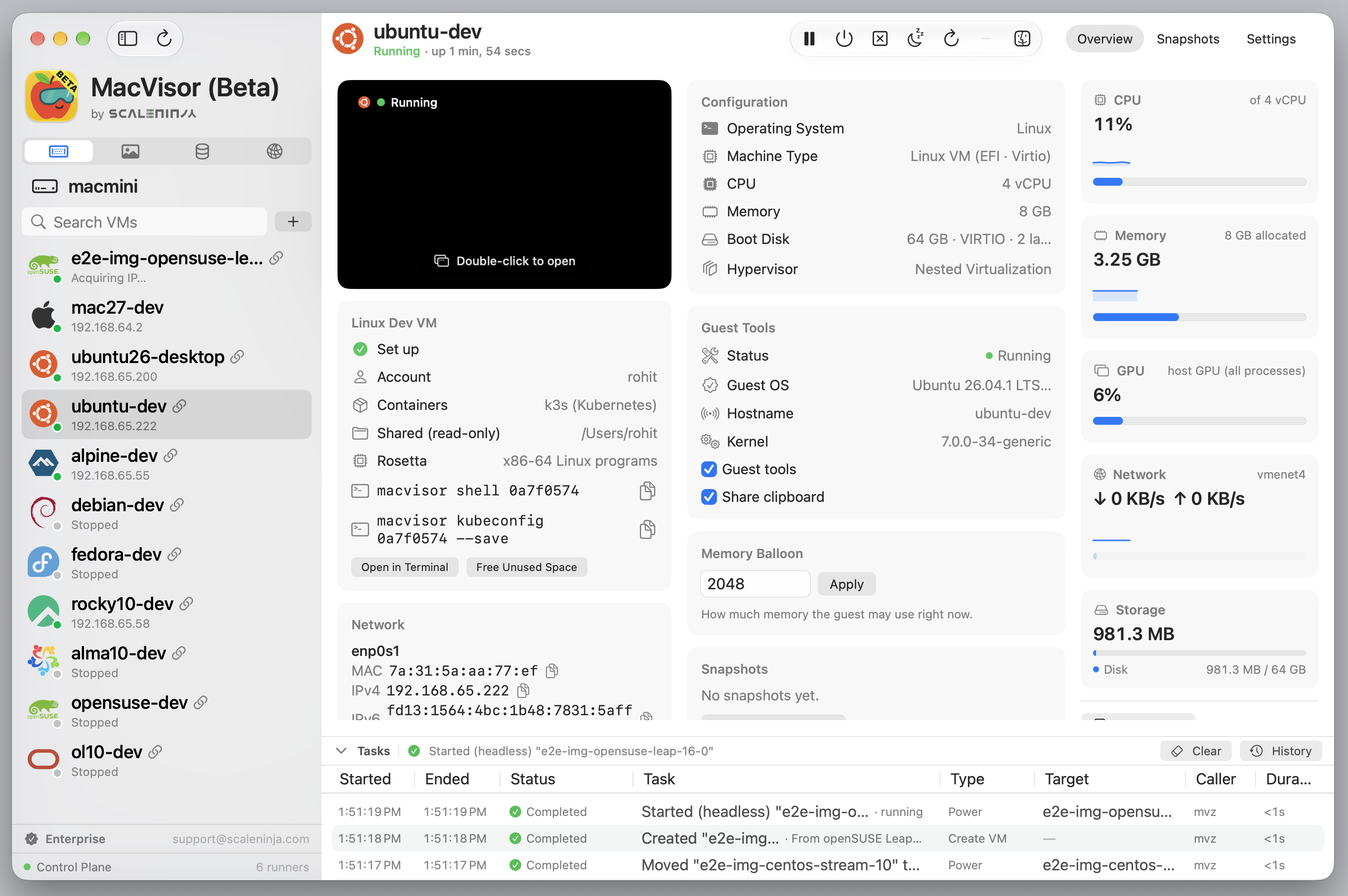
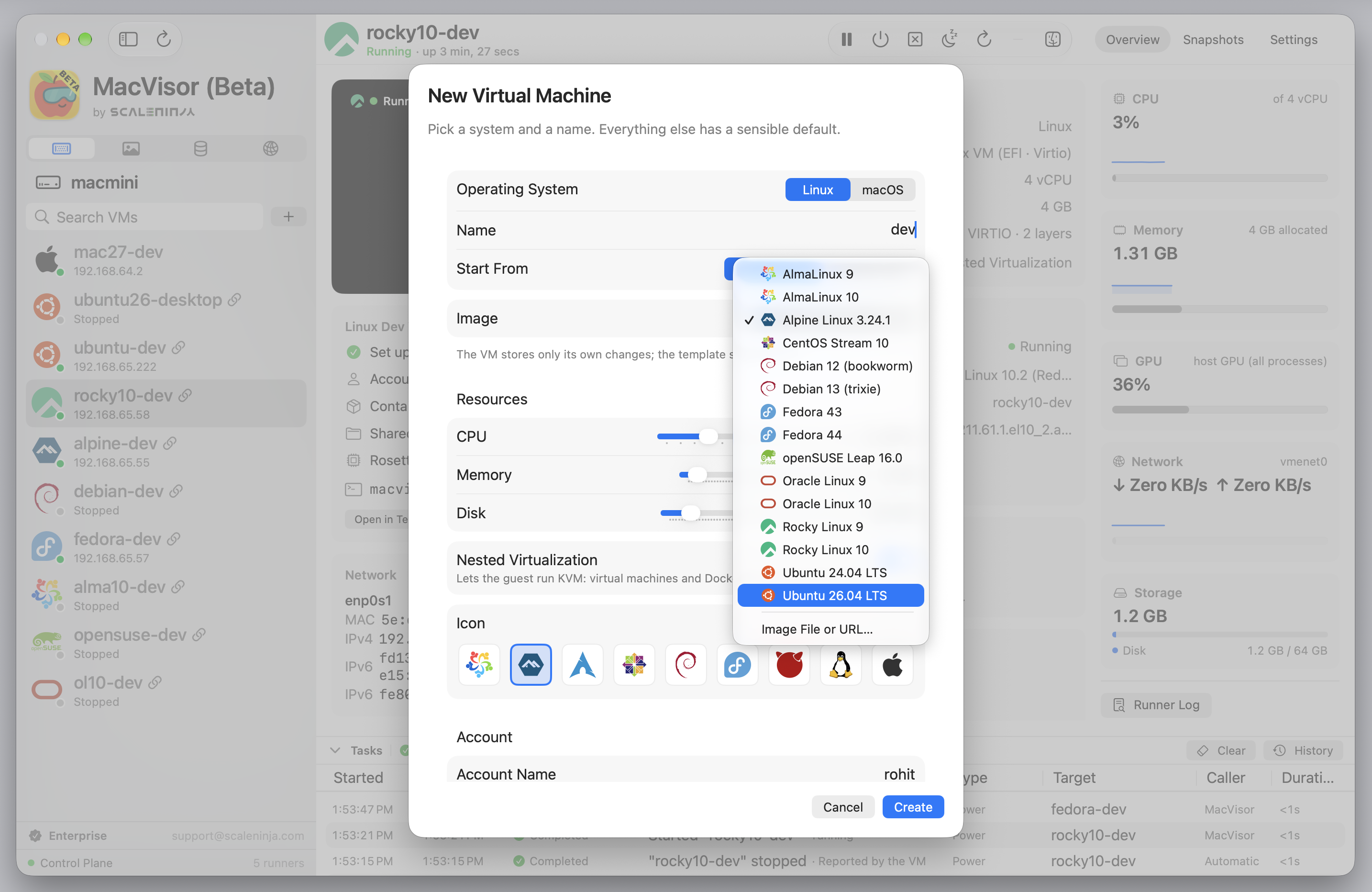
Linux VM
Account, containers, shared folders, guest tools, and live readings on one Overview tab.
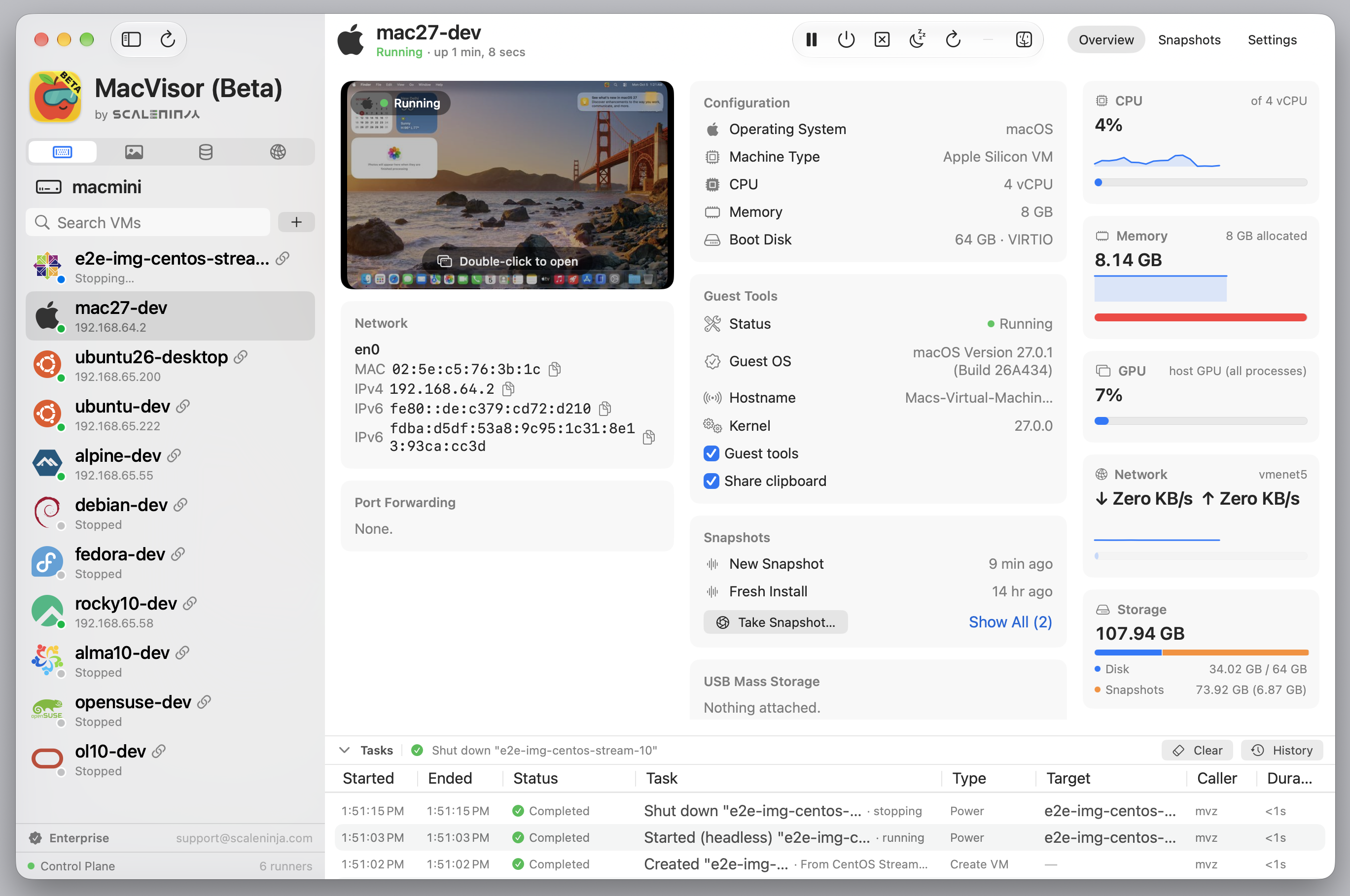
macOS 27 guest
Installed from Apple's image, signed in, with MacVisor Agent running.
New VM
Pick a cloud image or installer; everything else has a default.
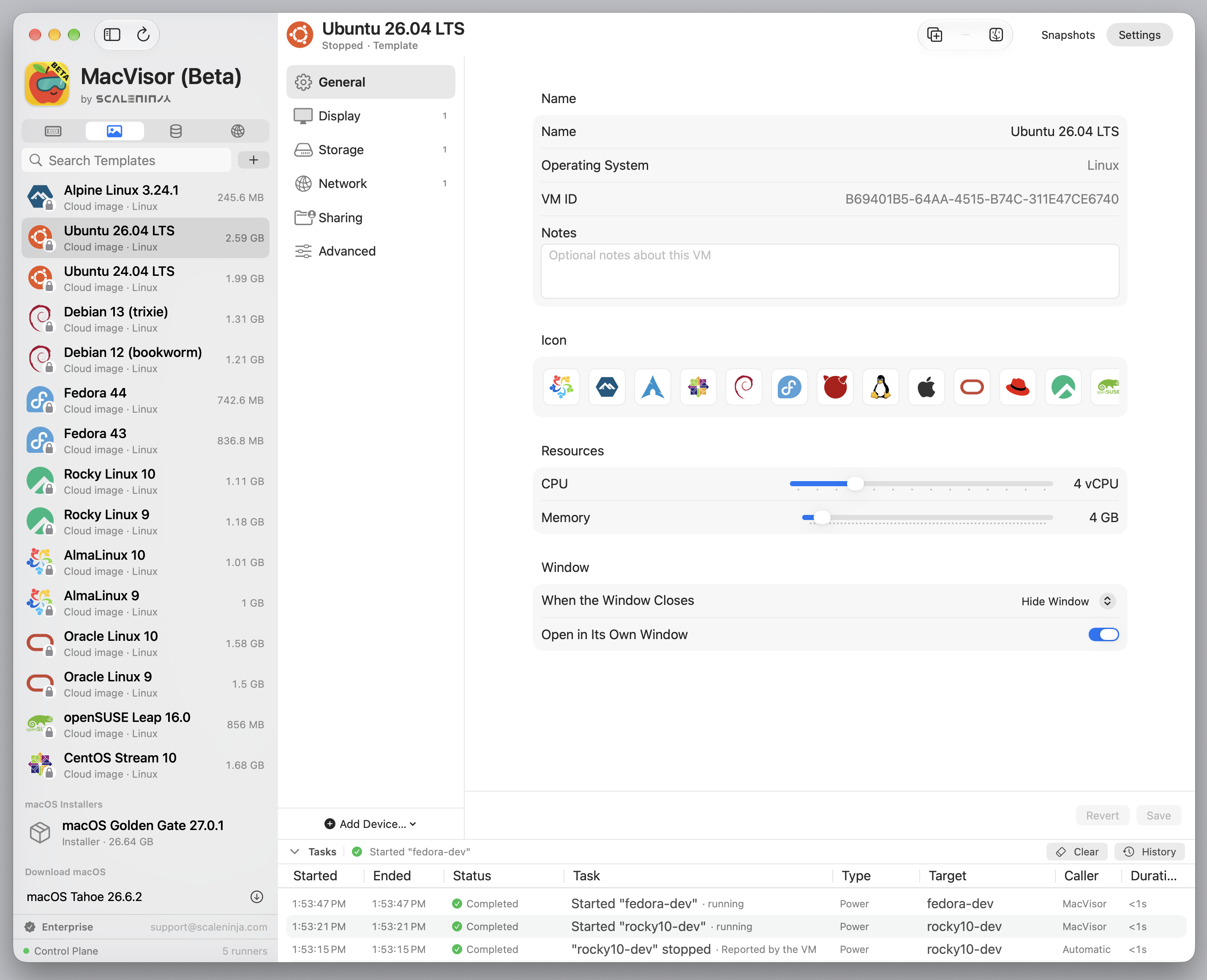
Templates
Linux Cloud Images, macOS Installers, and your own custom VM templates.
Storage
Every bundle with its logical, on-disk, and private size.
Networks
Firewall, Port groups, VLANs, and who is attached where.
Compare macOS Virtualization
Pick the tool that matches the workload.
MacVisor is not trying to be a Windows compatibility layer or a cross-architecture emulator. See where it fits against desktop hypervisors, native macOS VM apps, and CI-focused runtimes.
Join the list for release notes, platform notes, and what's coming next.
Enterprise
Running Macs as infrastructure?
MacVisor Enterprise is licensed per Mac, billed annually for 10 or more Macs, and comes with 24x7 support and an SLA:
help with CI/CD pipelines and unattended build Macs, firewall policy and custom networks,
and remote and headless access. Every feature is the same in every edition.
MacVisor has no analytics and no telemetry. On its own it connects for two things only:
checking your license with Polar, and checking whether a new version exists. Cloud images
and macOS installers are downloaded when you ask, from the vendor, and verified. Disks,
snapshots, and your guests' traffic never pass through us.
Snapshot the full machine, integrate with guests through the MacVisor Agent,
and build labs with VLAN bridges, named shared or host-only networks, address reservations, and host-enforced firewall policy.

 DeltaSnap
  DriveSync
  Noject
  DeltaSync