
 DeltaSnap
  DriveSync
  Noject
  DeltaSync

DeltaSnap turns native APFS snapshots into version control for every file and folder on your Mac. Checkpoint before risky work, search history for files you already deleted, diff two points in time, and restore the one item that broke instead of rolling back the machine.
Here is how it started, and what it does now.
My family kept losing files, and it was somehow my fault
My family blamed me every time a file went missing from their Macs. Fair enough. I am the one who set those Macs up.
Attempt one was Time Machine pointed at our household NAS. I learned fast that Time Machine over a network share is not robust enough to trust with the only copy of anything.
Attempt two was leaning on OneDrive and iCloud. That cost us some data outright, along with sync and latency problems, and both were painfully slow at syncing and restoring large sets of photos and documents. Cloud sync keeps files in two places. It does not keep the version from last Tuesday, and it will happily propagate a deletion.
Then I set up rsync over ssh on a cron schedule, pushing to a NAS running ZFS with zfs-auto-snapshot. That one is genuinely solid, and I still run it. It is also useless the moment those Macs leave the house, which is exactly when people do the kind of hurried work that loses files.
Every one of those attempts had the same shape: work around the filesystem by copying data somewhere else, on a schedule, over a network. None of them answered the question my family was actually asking, which was never "restore my disk." It was "where did this file go, and can I have the version from Tuesday."
The capability was already in the Mac
So I stopped working around the filesystem and looked at it directly.
APFS has had snapshots since 2017. A snapshot is a read-only, point-in-time view of a whole volume, and because APFS is copy-on-write, taking one copies nothing. It marks the current filesystem tree as frozen, and subsequent writes allocate new blocks instead of overwriting old ones. The snapshot only costs the divergence between then and now. Creating one takes about a second.
That is precisely the primitive I wanted. The tooling around it, though, is remarkably thin:
- Carbon Copy Cloner comes closest, but it does not index or diff them well.
snaputilcannot create a snapshot without a private entitlement from Apple. That limitation is documented in the open.- Disk Utility will happily show you snapshots and then refuse to let you make one.
A capability that good, sitting in every Mac for eight years, used almost entirely by backup software.
That gap is the whole reason DeltaSnap exists. Backup apps are a crowded red ocean, and I had no interest in shipping one more. The unexplored, riskier blue ocean was the layer nobody had built: snapshot management and version control as a first-class product, rather than an implementation detail hidden inside somebody's backup engine.
Getting the entitlement
I wanted more than yet another backup app: a fast undo layer for the whole volume, closer to what ZFS gives you on a server, running alongside real backups to an external drive rather than pretending to replace them.
The second motivation arrived while I was experimenting with AI coding tools. I wanted local filesystem checkpoints that would let me see exactly what those tools were doing to my machine, not just to the files I had committed.
Creating APFS snapshots programmatically requires a private entitlement that Apple grants case by case. I built a prototype, wrote the pitch, and submitted it. The Apple DTS and APFS teams reviewed it, took their time, and eventually granted ScaleNinja the private APFS snapshot entitlement that made DeltaSnap possible: native APFS snapshot management and version control software for macOS.
That entitlement lives in a signed background helper. The app, the Finder extension, and the dsnap CLI all talk to it over an authenticated local connection, which is what lets schedules, pruning, indexing, monitoring, and restores keep working after you close the main window.
What DeltaSnap does
Version Control, per file
Most snapshot tools make you pick a snapshot first and go hunting. DeltaSnap inverts that. It indexes the filesystem history inside each snapshot, then presents a browser that unions three things: files that exist on the live volume, files that were captured and later deleted, and historical children that no longer exist at their old path.
Select any item and you get its version timeline, with each captured state, its date range, its size, and how many retained snapshots can still serve it.
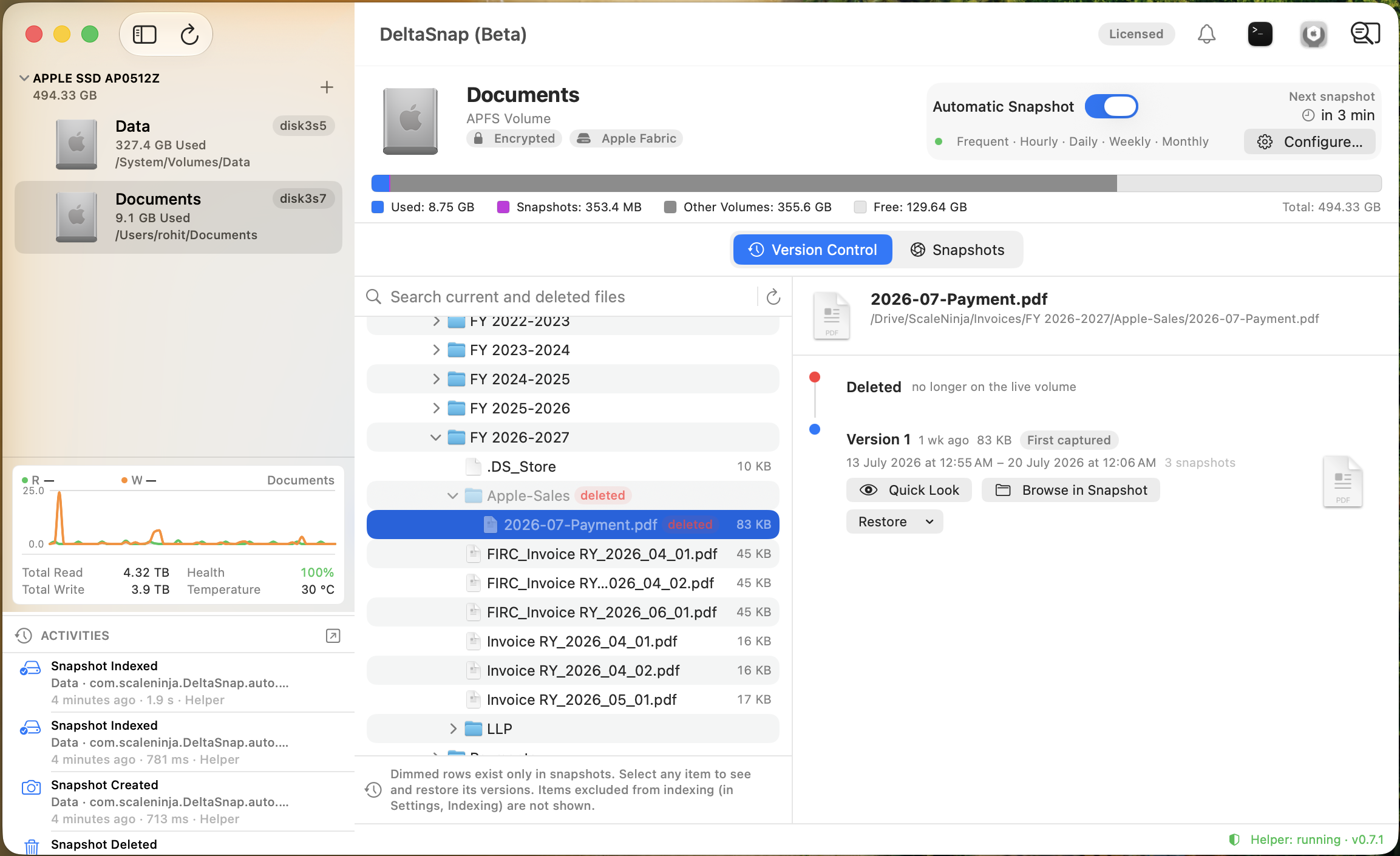
You can search this by name across every managed volume, including files that only exist in history. That is the feature my family actually needed.
Diffs, not guesswork
Select two snapshots on the same volume and DeltaSnap reports path-level changes between them: added, removed, modified, replaced, and moved. Move detection pairs filesystem identity across old and new paths, so a renamed folder does not show up as one giant delete plus one giant add.
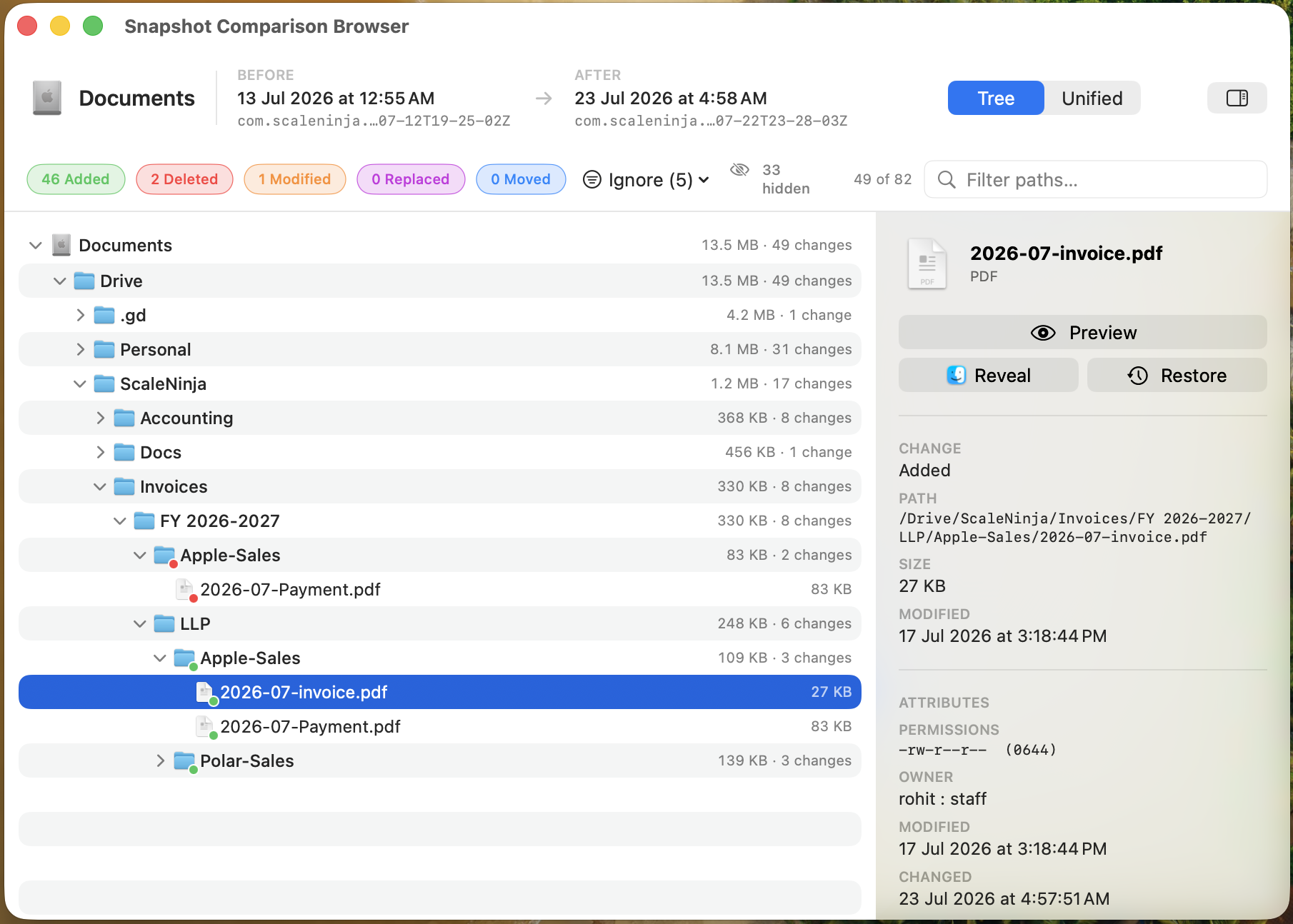
Indexing exclusions keep the noise out by default: caches, application bundles, node_modules, and most of Library. When you specifically need to look inside an excluded tree, Compare Everything runs a one-off exclusion-free scan.
Restore one file, not the whole Mac
Restore a Copy is the default and the safe one. DeltaSnap clones the historical item next to the original with its version date in the name, and leaves the live file alone.
Replace Original swaps the live path atomically, and offers to take a safety snapshot first. It also verifies the live item has not changed since the restore was prepared, so a long copy can never silently overwrite work that happened during it. Replacing a folder always captures a safety snapshot at the moment of the swap, regardless of the checkbox. A whole-tree replacement never runs without a recovery point.
Right from Finder
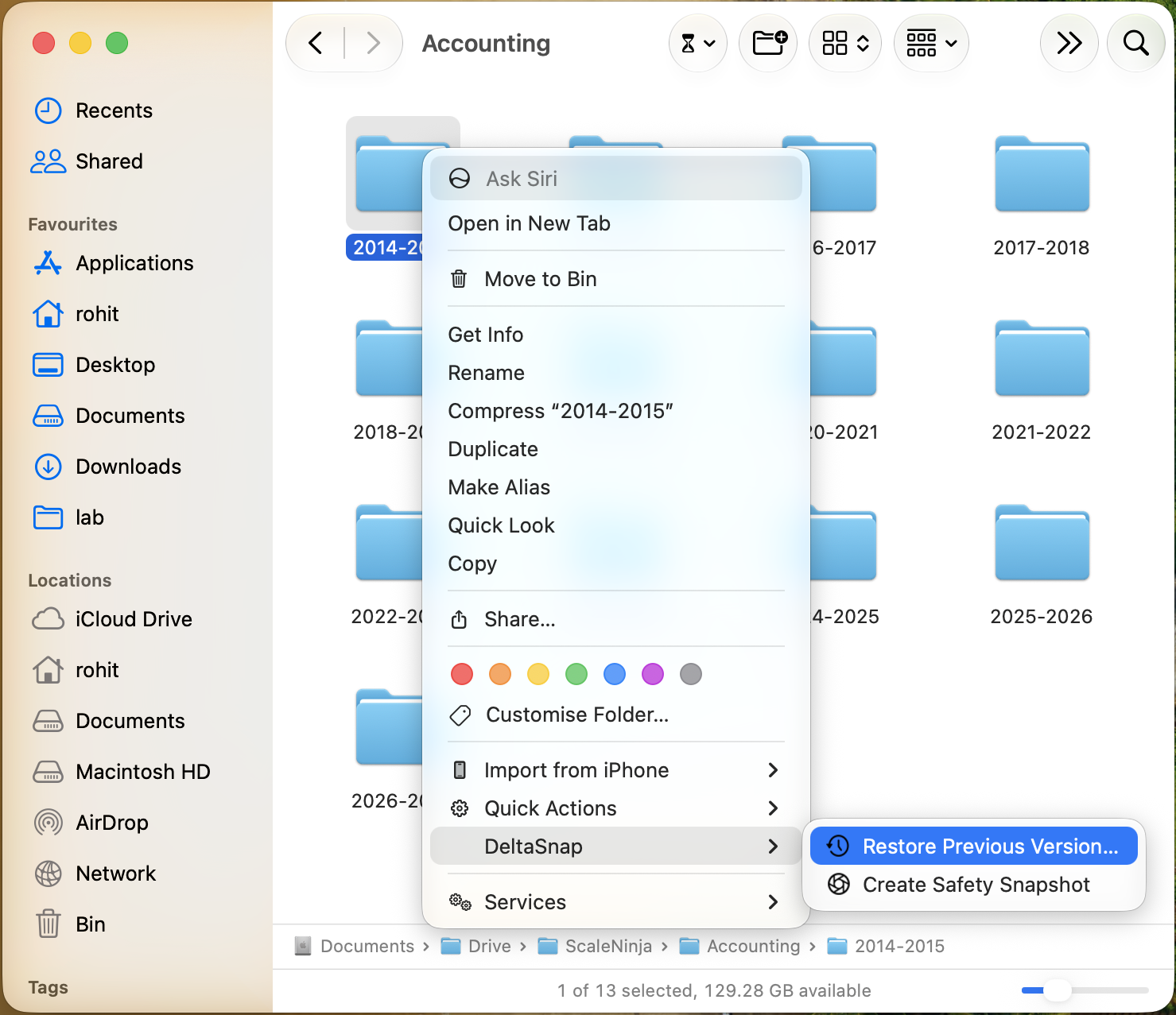
Right-click any file or folder for Restore Previous Version and Create Safety Snapshot, without opening the app.
Schedules that expire on their own
Per-volume cadences run in the background helper: frequent, hourly, daily, weekly, monthly. The suggested policy keeps 4 frequent, 24 hourly, and 7 daily snapshots, which covers roughly the last week without noticeable disk cost. Safety snapshots carry a TTL. Low-space pruning thins unprotected history gradually when free space drops below a threshold, keeps the newest snapshot of each cadence, and never deletes the last snapshot on a volume. Anything you protect survives every automatic pruner.
A CLI, and a skill for AI agents
The bundled dsnap CLI brings a ZFS-shaped workflow to macOS:
PRE=$(dsnap snapshot --safety documents@ai-pre-upgrade)
# let the agent, script, or installer run
POST=$(dsnap snapshot --safety documents@ai-post-upgrade)
dsnap diff "$PRE" "$POST" --format=tree
That loop is the second motivation from earlier, made concrete. An agent can rewrite, rename, or delete hundreds of files in one run, and its reach extends past committed source code into documents, media, and local configuration. Git cannot explain that blast radius. A volume checkpoint and a filesystem diff can.
There is an open-source Agent Skill that teaches Claude Code, Codex, Cursor, GitHub Copilot, Gemini CLI, and other skill-aware tools to checkpoint before risky work, verify what actually changed afterward, and recover individual files. It never deletes snapshots it did not create, and never attempts a whole-volume rollback.
What DeltaSnap is not
It is not a backup, and I am not going to pretend otherwise.
APFS snapshots live on the same volume as your files. They are excellent against deletion, overwrite, a bad update, and a runaway script. They are worth nothing against a failed drive, a wiped volume, a stolen laptop, or a fire.
| Recovery layer | Best at | Does not survive |
|---|---|---|
| DeltaSnap and APFS snapshots | Fast file history, inspection, comparison, local recovery | Loss or erase of the source volume |
| Independent local backup | Large restores from a separate disk or NAS | Theft or disaster affecting both devices |
| Remote or offsite backup | Site-wide loss | Fast interactive recovery of a single edit |
Run DeltaSnap alongside Time Machine or CCC. That was always the design, and it is the same conclusion I reached the hard way with a NAS in the other room.
Try DeltaSnap
DeltaSnap requires macOS 15 or later and an APFS volume.